Scenery and TiledMap - GuidebeeGameEngine/Raindrop GitHub Wiki
Our RainDrop Game only has a dark blue background,looks a bit dull. This tutorial we will add a scenery (or TiledMap) to show a more pretty background. Similar real world digital map (like google map) . A Map can have multiple layers (like satellite map layer, traffic layer). in Guidebee Game Engine A. map is a set of layers. A layer contains a set of objects. Maps, layers and objects have properties . The class hierarchy of the map related classes looks as follows:

#Properties Properties of maps, layers or objects are represented by MapProperties . This class is essentially a hash map, with string keys and arbitrary values. Which key/value pairs are available for a map, layer or object depends on the format from which it was loaded. To access properties, you can simply do the following:
map.getProperties().get("custom-property", String.class);
layer.getProperties().get("another-property", Float.class);
object.getProperties().get("foo", Boolean.class);
Many of the supported editors allow you to specify such properties on maps, layers and objects. What specific type these properties have is format specific.
#Map Layers Layers within a map are ordered and indexed, starting by index 0. You can access the layers of a map like this:
MapLayer layer = map.getLayers().get(0);
You can also search a layer by name
MapLayer layer = map.getLayers().get("my-layer");
These getter methods will always return a MapLayer. Some layers may be specialized and offer more functionality, in which case you can simply cast:
TiledMapTileLayer tiledLayer = (TiledMapTileLayer)map.getLayers().get(0);
A layer has a few attribute that we try to normalize for every supported map format:
String name = layer.getName();
float opacity = layer.getOpacity();
boolean isVisible = layer.isVisible();
You can also modify these which may have an effect on how the layer is rendered. In addition to these normalized attributes, you can also access the more generic properties, as described above. To get the objects within the layer, simply call the following:
MapObjects objects = layer.getObjects();
The MapObjects instance allows you to retrieve objects by name, index or type. You can also insert and remove objects on the fly.
#Map Objects The API already provides a handful of specialized map objects, such as CircleMapObject, PolygonMapObject and so on. The loader of a map format will parse these objects and put them in their respective MapLayer. For all supported formats, we try to extract the following normalized attributes for every object:
String name = object.getName();
float opacity = object.getOpacity();
boolean isVisible = object.isVisible();
Color color = object.getColor();
The specialized map objects, like PolygonMapObject may also have aditional attributes, e.g.
Polygon poly = polyObject.getPolygon();
Changing any of these attributes may have an effect on how the object is rendered. As in the case of maps and layers, you can also access the more generic properties, as described above. Note: tiles of a tiled map are not stored as map objects. There are specialized layer implementations that store these kind of objects more efficiently, see below. Objects as described above are generally used to define trigger areas, spawn points, collision shapes and so on.
#Tiled Maps Maps that contain layers with tiles are handled by the classes in the com.guidebee.game.maps package. Tile maps are loaded into TiledMap instances. TiledMap is a subclass of the generic Map class, with additional methods and attributes.
#Tiled Map Layers Layers with tiles in them are stored in TiledMapTileLayer instances. In order to get access to the tiles, you will have to cast:
TiledMap tiledMap = loadMap(); // see below for this
TiledMapTileLayer layer = (TiledMapTileLayer)tiledMap.getLayers().get(0);
A TiledMapTileLayer has all the same attributes as the generic MapLayer, e.g. properties, objects and so on. In addition to those, the TiledMapTileLayer also has a two dimensional array or TiledMapTileLayer.Cell instances. To access a cell, you can ask the tile layer to hand it out like this:
Cell cell = tileLayer.getCell(column, row);
Where column and row specify the location of the cell. These are integer indices. The tiles are supposed to be in a y-up coordinate system. The bottom left tile of a map would thus be located at (0,0), the top right tile at (tileLayer.getWidth()-1, tileLayer.getHeight()-1). If no tile exists at that position, or if the column/row arguments are out of bounds, null will be returned. You can query the number of horizontal and vertical tiles in a layer by:
int columns = tileLayer.getWidth();
int rows = tileLayer.getHeight();
#Cells A cell is a container for a TiledMapTile . The cell itself stores a reference to a tile in addition to attributes that specify if the tile should be rotated or flipped when rendering it. Tiles are usually shared by multiple cells.
#Tilesets & Tiles A TiledMap contains one or more TiledMapTileSet instances. A tile set contains a number of TiledMapTile instances. There are multiple implementations of tiles, e.g. static tiles, animated tiles etc. You can also create your own implementation for special purposes. Cells in a tile layer reference these tiles. Cells within a layer can reference tiles of multiple tile sets. It is however recommended to stick to a single tile set per layer to reduce texture switches.
#TMX/Tiled maps Tiled is a generic tile map editor for Windows/Linux/Mac OS X that allows you to create tile layers as well as object layers, containing arbitrary shapes for trigger areas and other purposes. Guidebee Game Engine can load tmx formatted map directly.
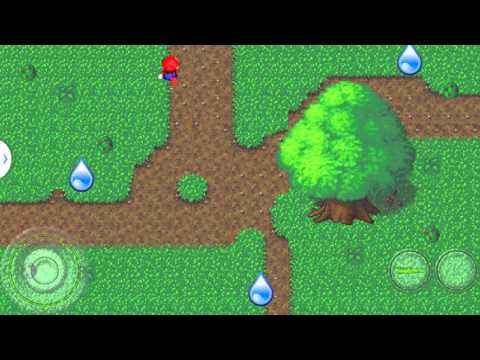
Here’s a tutorial on how to use Tiled to create TiledMap. Since we set our RainDrop viewport to 800X480. we use Tiled Tools create a tmx map like the following:

#Scenery With our Stage-Actor pattern, Stage can associate a Scenery, which actually is a tiled Map. Our tiled map has 5 layers: Collision, Top, Foreground, Berries, Background. We want our actors (RainDrop and Mario) show between some of the layers. that is
Background berries ####[Actors — RainDrop and Mario] Foreground Top
For example, Mario now is hiding behind the tree.

Now we have the tiled map resources, we modify our raindrop game to load the tiled map.
First use assetManager to load the tmx file:
assetManager.load("tiledmap/forest.tmx", TiledMap.class);
The in the DropScene class, we attach the tiledmap to Stage’s scenery:
private TiledMap background= assetManager.get("tiledmap/forest.tmx", TiledMap.class);

private Scenery scenery=new Scenery(background);
...
scenery.setBackGroundLayers(new int[]{0,1,2});  //draw behind actors
scenery.setForeGroundLayers(new int[]{3,4});    //draw in front of actors
sceneStage.setScenery(scenery);
Here’s the demo video