Collision Detection - GuidebeeGameEngine/Raindrop GitHub Wiki
Guidebee Game Engine’s Stage-Actor pattern has Collision Detection mechanism build in,which make game developer’s life much easier , in the first version of raindrop we already used Stage’s build-in collision detection , at the time, only two actors (Bucket and RainDrop ,later Bucket was replaced by Mario) can collide with each other.
In the DropScene we setup the stage’s collision listener :
sceneStage.setCollisionListener(rainDropGroup);
and use RainDropGroup as the collision Listener :
@Override
    public void collisionDetected(Collision collision) {
        if(collision!=null){
            Actor actor1=(Actor)collision.getObjectA();
            Actor actor2=(Actor)collision.getObjectB();
            if(actor1!=null && actor2!=null){
                if(actor1.getName()=="Mario" && actor2.getName()=="RainDrop"){

                    actor2.getParent().removeActor(actor2);
                    dropSound.play();
                }else if(actor2.getName()=="Mario" && actor1.getName()=="RainDrop"){

                    actor1.getParent().removeActor(actor1);
                    dropSound.play();
                }
            }
        }


    }
If stage detects any two collidable objects collide with each other, it triggers CollisionDetected(collision: Collision) events. The Collision object contains ObjectA and ObjectB ,which are two objects involved in the collision. There are four different collision type :
- BOUNDING_RECT use bounding rectangle(AABB) for collision checking.
- BOUNDING_AREA use bounding area(polygon or other shapes) for collision checking.
- BOUNDING_CIRCLE use bounding circle for collision checking.
- BOX2D_CONTACT use box2d world for collison checking.
The class hierarchy diagram of collidable classes is shown as below:

By default, Actor’s collision is enabled, while objects in the scenery (like MapObjects ,TileMapTile) are disabled. when collidable object is disabled , Stage will not check if it’s collide with other or not and will not reports there’s any collision associated with it.
When we add the Scenery (Forest) and Tiled Map, in the tmx Map project, we included one layer called Collision and also defined a RectangleMapObject called ” TreeCollisionArea” ,and since by default ,all objects in tiledMap’s collision is disabled for performance consideration, we need to enable ” TreeCollisionArea ” collision status, allow Stage to report if Mario has collided with the Tree Trunk or not.

MapLayer mapLayer=background.getLayers().get("Collision");
MapObject treeCollisionArea=mapLayer.getObjects().get("TreeCollisionArea");
treeCollisionArea.setEnabled(true);
Now we modified RainDropGroup’s collisionDetected event handler
@Override
   public void collisionDetected(Collision collision) {

       if(collision!=null){
           Collidable objectA=collision.getObjectA();
           Collidable objectB=collision.getObjectB();
           if(objectA instanceof Mario){
               if(objectB instanceof RectangleMapObject) { //tree trunk
                   ((Mario)objectA).stopMoving();

               }else if(objectB instanceof RainDrop){
                   ((Actor)objectB).getParent().removeActor((Actor) objectB);
                   dropSound.play();
               }
           }else if(objectA instanceof RainDrop){
               if(objectB instanceof Mario){
                   ((Actor)objectA).getParent().removeActor((Actor) objectA);
                   dropSound.play();
               }
           }else if(objectA instanceof RectangleMapObject){
               if(objectB instanceof Mario){
                   ((Mario)objectA).stopMoving();
                   dropSound.play();
               }
           }

       }


   }
Beside Collision Event handler, you can also query(pooling) Stage to check if two objects collide or not with method boolean collisionQuery(Collidable collidable, Collidable otherCollidable, int collisionType). For Mario and Tree, it seems more reasonable to use pooling in it’s act method. if there’s collision with tree,dont allow Mario to move.
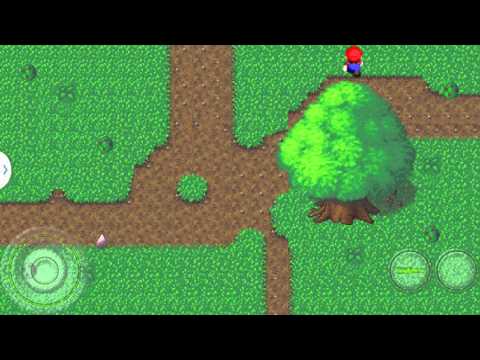
Now you can see when Mario touches the tree, he stops moving. If using pooling , you can have the following code changes:
in Mario class
private Collidable treeArea=null;
...
public void setTreeArea(Collidable treeArea){
        this.treeArea=treeArea;
    }

private boolean isCollideWithTree(){
        if(treeArea!=null){
            return Stage.collisionQuery(this,treeArea);
        }
        return false;
    }

..
private void handleKeyPress(){

        if(!isCollideWithTree()) {
            oldX=getX();
            oldY=getY();
            switch (currentDirection) {
                case WEST:
                    setTextureRegion(leftAnimation.getKeyFrame(elapsedTime, true));
                    setX(getX() - 200 * graphics.getDeltaTime());
                    break;
                case EAST:

                    setTextureRegion(rightAnimation.getKeyFrame(elapsedTime, true));
                    setX(getX() + 200 * graphics.getDeltaTime());
                    break;
                case NORTH:

                    setTextureRegion(forwardAnimation.getKeyFrame(elapsedTime, true));
                    setY(getY() + 200 * graphics.getDeltaTime());
                    break;
                case SOUTH:
                    setTextureRegion(backwardAnimation.getKeyFrame(elapsedTime, true));
                    setY(getY() - 200 * graphics.getDeltaTime());
                    break;

            }

            if (getX() < 0) setX(0);
            if (getY() < 0) setY(0);
            if (getX() > 800 - 64) setX(800 - 64);
            if (getY() > 480 - 64) setY(480 - 64);
        }else{

            stopMoving();
        }
    }
With this change, Mario can never pass through the tree collision area.
Note: You may find the collision event handler is a bit messy, for real game programming, you may need to split the code into smaller methods if you have many collidable objects in your game, we will cover Entity System Framework later to develop more clear ,easy maintainable game logic.