Bring Physics to your Game World - GuidebeeGameEngine/Raindrop GitHub Wiki
Ever wondered how angry bird was developed? It uses Box2D physics simulator engine. From wiki :
Box2D performs constrained rigid body simulation. It can simulate bodies composed of convex polygons, circles, and edge shapes. Bodies are joined together with joints and acted upon by forces. The engine also applies gravity, friction, and restitution.
Box2D’s collision detection and resolution system consists of three pieces: an incremental sweep and prune broadphase, a continuous collision detection unit, and a stable linear-time contact solver. These algorithms allow efficient simulations of fast bodies and large stacks without missing collisions or causing instabilities.
Box2D itself is a big topic to cover, we’ll start a new serials on how to use Box2D in Guidebee Game Engine. Guidebee Game Engine provides build-in Box2D support, and with the help of Stage-Actor pattern, a couple of convenient methods are included in Stage and Actor class ,which bridge the Box2D world and your normal game world. Box2D uses MKS (meters, kilograms, and seconds) units and radians for angles , a lot of developers may have trouble working with meters because your game is expressed in terms of pixels.
Guidebee Game Engine provide helper methods internally you can still use pixels (or virtual pixels in our RainDrop game ,we forced the screen to use 800 X 480 resolution no matter what’s your physical device resolution is, we call this 800X480 are virtual pixel resolution). The default pixel to box2d unit is defined in GameEngine with name “pixelToBox2DUnit”. default it has a value 32 ,means 32 pixels equals 1 meter in Box2D world. This value should fit for most of box2d games ,you can adjust the value if you need to. Two helper methods toBox2D and toPixel are used to convert unit between two worlds. But normally you don’t need to use them directly. Guidebee Game Engine handle them for you internally.
com.guidebee.game.physics and com.guidebee.game.physics.joints are wrapper packages for the Box2D library (which is written in C++) use JNI. Again for most of cases you dont need to use them directly. Use methods in Stage and Actor instead.
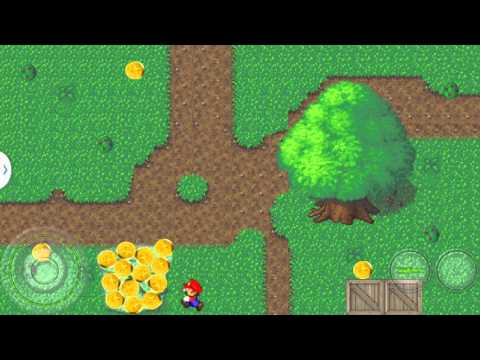
Now let make some changes in our RainDrop (Now should call Mario-Collect-Coins )game.
First we initialize the box2d world in a stage object:
sceneStage.initWorld();
initWorld method initialize the box2d world and assign world object to GameEngine.world ,which you may reference it later. and also this method need be called before you create other box2d bodies. next we changed Raindrop to use golden coin image, Raindrop is liquid , golden coins make more sense as rigid object (although you can still use raindrop, just pretend them to be solid :-).
public RainDrop(){
   super("RainDrop");
    setTexture(assetManager.get("coin.png",Texture.class));

}
and when RainDropGroup create new Raindrop (golden coins) ,we also create it’s box2d counterparts:
private void spawnRainDrop(){
    RainDrop rainDrop=new RainDrop();
    rainDrop.setPosition(MathUtils.random(0,800-64),480);
    Rectangle dropRect=new Rectangle(0,0,32,32);
    rainDrop.initBody(BodyDef.BodyType.DynamicBody,
           Shape.Type.Circle, dropRect,1.0f,0,0.1f);
    addActor(rainDrop);
    lastDropTime= TimeUtils.nanoTime();
}
initBody create a box2d body for the golden coins, the last two parameters are restitution and friction , here want the coin to sticky(dont bounce back) and have a little friction when touch other bodys. and since Box2d simulate real world, which gravity will make the golden coin fall, so in the RainDropGroup’s act method, we dont need to update raindrop’s position ourselves. Box2d’s gravity takes care of it:
@Override
public void act(float delta){
    if(TimeUtils.nanoTime()-lastDropTime>1000000000) {
        spawnRainDrop();
    }

    RainDrop [] rainDrops=getChildren().toArray(RainDrop.class);
    for(RainDrop rainDrop: rainDrops){
        float y = rainDrop.getY();

        if(y+64 <0){

            removeActor(rainDrop);
        }

    }
}
Next we modified our background, to make the game more interesting, we added a static bucket and tow boxes , when golden coins fall into the bucket, the bucket can hold those coins, while the boxes will stop the golden coin from falling. you can still real world interactions between these objects.

We use edge bodys to represent bucket and boxes:
package com.mapdigit.game.tutorial.drop.actor;

import com.guidebee.game.scene.Actor;


public class EdgePlatform extends Actor {
    public EdgePlatform(){
        setPosition(0,0);

    }
}

.....
package com.mapdigit.game.tutorial.drop.actor;


import com.guidebee.game.scene.Group;


public class StaticArea extends Group {
    private final EdgePlatform bottomLeftPlatform;
    private final EdgePlatform bottomRightPlatform;
    private final EdgePlatform LeftPlatform;
    private final EdgePlatform rightPlatform;


    private final EdgePlatform boxBottomPlatform;
    private final EdgePlatform boxLeftPlatform;
    private final EdgePlatform boxrightPlatform;


    public StaticArea(){
        bottomLeftPlatform=new EdgePlatform();
        bottomLeftPlatform.initEdgeBody(176f, 16f, 224f, 0f, 1.0f, 0f, 0.5f);

        bottomRightPlatform=new EdgePlatform();
        bottomRightPlatform.initEdgeBody(224f, 0f, 272f, 16f, 1.0f, 0f, 0.5f);

        LeftPlatform=new EdgePlatform();
        LeftPlatform.initEdgeBody(160f, 112f, 176f, 16f, 1.0f, 0f, 1f);

        rightPlatform=new EdgePlatform();
        rightPlatform.initEdgeBody(272f, 16f, 288f, 112f, 1.0f, 0f, 1f);

        boxBottomPlatform=new EdgePlatform();
        boxBottomPlatform.initEdgeBody(576f, 64f, 704f, 64f, 1.0f, 0f, 1f);

        boxLeftPlatform=new EdgePlatform();
        boxLeftPlatform.initEdgeBody(576f, 0f, 576f, 64f, 1.0f, 0f, 1f);

        boxrightPlatform=new EdgePlatform();
        boxrightPlatform.initEdgeBody(704f, 0f, 704f, 64f, 1.0f, 0f, 1f);
    }

}
initEdgeBody create edge body for the bucket and boxes. and it uses pixel coordinate system.
We still want to control Mario to move around, it doesn’t need to have a box2D counterpart. we keep Mario and collision event handler unchanged.
Now you can looks video of Mario-Catch-Coins game :-)