Connecting to GTProxy - GuckTubeYT/GTProxy GitHub Wiki
Now, on this page will tell you how to Connecting to GTProxy
Windows
- run Command Prompt as Administrator
- type
notepad drivers/etc/hostson Command Prompt, and it will open Notepad - and then, type
127.0.0.1 www.growtopia1.comand127.0.0.1 www.growtopia2.comon hosts, and it will like this
- save it, and then you can run the proxy
Linux
- Install text editor app (i recommended using nano)
- After install text editor app, type
sudo nano /etc/hosts(if you are on root user, you no need to addsudocommand) - and then, type
127.0.0.1 www.growtopia1.comand127.0.0.1 www.growtopia2.comon hosts, and it will like this

- press CTRL + X to save the file, and then, you can run the proxy
Android
- Download and Install PowerTunnel-Android here
- After download and install PowerTunnel-Android, Download PowerTunnel-WebRedirect Plugin here
- To add the plugin, open PowerTunnel app, and then press Plugins
- And then, press + to install the plugin, and then select PowerTunnel-WebRedirect.jar
- After add the plugin, press options at WebRedirect
- And then, make it like this
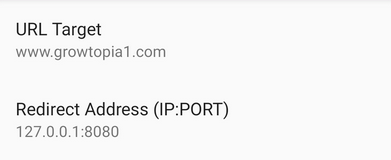
- After you set like that screenshot, goto back, and checklist the PowerTunnel-WebRedirect
- now you can start the PowerTunnel
- after start the PowerTunnel, goto httpService, and then change port to 8080 at line 163
- after change the port, build (type
bash build.sh) and then you can run the proxy./proxy
- If you still dont understand, you can watch this video https://youtu.be/GRho3wUTuKY