Gen3 Admin Getting Started - GT-Edge-AI/GT-AI-OS GitHub Wiki
Control Panel Getting Started
Start Here
- To get the GT AI OS Control Panel Quick Start Manual for your version of GT AI OS, go here.
- Ensure you select the manual for your currently deployed version of GT AI OS.
- Feel free to browse any version manual as you wish.
- Sign in to the Control Panel operator UI.
- Super Admins on a new deployment: follow QuickStart (sidebar item or dashboard banner) before onboarding tenant users.
- Open Dashboard for quick-view KPI widgets and drill-down panels.
- Review Models before tenants consume new providers.
- Configure Email Settings, GT Helper Settings, and Instructions Settings for tenant-facing behavior.
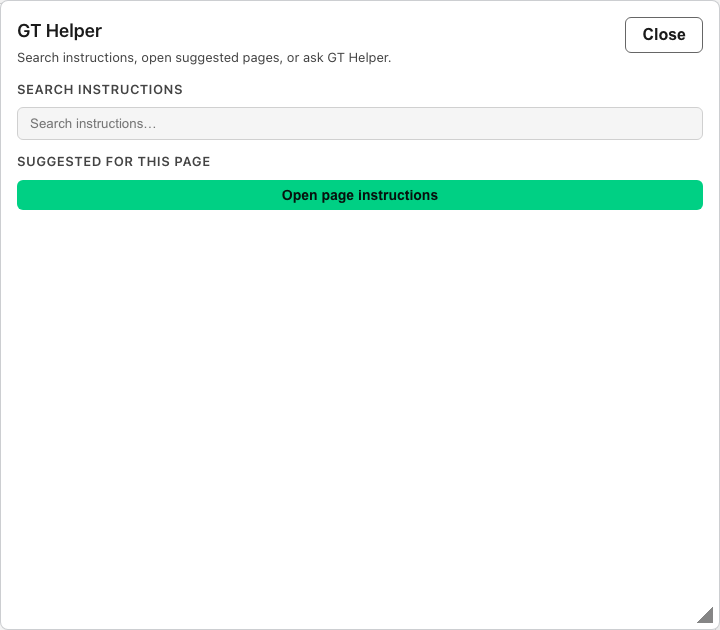
- Use the ? help shelf (GT Helper) on the Control Panel shell for operator instructions search and Ask helper chat.
Why this matters
Control Panel operators own deployment-wide integration, policy, and observability—distinct from tenant self-service workspaces.
Details
The Gen 3 Control Panel is the operator workspace for deployment-wide administration. These pages are distinct from the tenant app and focus on runtime posture, identity, model integration, licensing, billing controls, and deployment configuration.
Active Control Panel workspaces
| Workspace | What it currently controls |
|---|---|
| Dashboard | quick-view KPI widgets, drill-down panels, and default-models banner |
| QuickStart | Super Admin setup guide overlay coach, universal baseline apply, and completion tracking |
| Users | operator and tenant-app account administration, bulk CSV import, and select-all-matching bulk actions |
| SSO Providers | upstream OIDC or SAML providers plus provisioning policy |
| Models | inference providers, configured models, default model selections, and Platform Multimodal Settings |
| Updates | immutable release update requests, approval, rollback, and progress monitoring (gated — see note below) |
| Backup & Restore | CNPG backup schedules, on-demand runs, and staged database restore workflows (gated — see note below) |
| Financial Controls | billing enablement, Infra Credits posture, base fees, pricing, allocations, and budget policy |
| Email Settings | SMTP transport, support policy, welcome-email controls, and broadcast send/review |
| Email Templates & Modules | welcome, password-reset, broadcast template authoring and reusable header/footer modules |
| License | license status, deployment identifier, and activation |
| Access Logs | sign-in and session-event review |
| CTP Helper Usage | Control Panel ? help-shelf thread and token observability |
| GT Helper Settings | GT Helper enablement, internet search, model overrides, and system-prompt source layers |
| Contextual Memory | platform-layer memory indexing, embedding/summary models, TTL, and re-embed operations |
| Compliance Mode | deployment-wide compliance copy and notice posture |
| Instructions Settings | optional external instructions link exposed in both apps |
| GT Helper | Control Panel ? help shelf — wiki search, page suggestions, and Ask helper chat |
| Settings | deployment branding, tenant appearance, default chat preferences, chat media retention, operator security, session policy, and object storage targets |
| Advanced Management | day-two gt-ai-os-admin validate/update/bootstrap commands after install |
Gated workspaces (honest availability)
Updates and Backup & Restore remain in the sidebar for navigation continuity, but the full operator UX may be behind a feature gate in your build. When gated, the route shows an under development placeholder instead of live orchestration or CNPG automation. Treat CLI/runbook paths documented in Advanced Management and release notes as the source of truth until the gated UI is enabled in your deployment. Object storage configuration inside Settings follows the same pattern when object-storage UX is gated.
Recommended first operator walkthrough
- Super Admins: complete QuickStart (or confirm it is already finished) so default models, pricing, SMTP, and helper settings are not blocking tenant chat.
- Open Dashboard to confirm license, user, and default-model posture from the quick-view widgets.
- Review Users to confirm the account mix and MFA state.
- Check Models if the deployment depends on external inference providers or local LAN hosts (Ollama, vLLM, SGLang, llama.cpp).
- Confirm Email Settings, GT Helper Settings, and License before onboarding users.
- Use Settings for deployment-wide posture such as tenant appearance, default chat preferences, branding, and session timeout.
- When your build enables the full routes, use Backup & Restore for CNPG schedules and restore drills; otherwise follow Advanced Management runbooks.
Important route boundaries
Modelsnow absorbs the provider and API-key workflows; the legacyprovidersandapi-keysURLs are redirect shims into the models page.Financial Controlsis for pricing and billing policy, not the place to activate a license.Settingsis for deployment-level configuration, while tenant policy lives in the tenant appAccount Settingspage.
Migration note
Gen 2 operator docs remain live in parallel. Gen 3 Control Panel pages are namespaced under gen3-admin/... so the active Gen 3 operator shell can be documented without disturbing the still-supported Gen 2 corpus.