Intersection - FritzsHero/RoadArchitect GitHub Wiki
Intersection
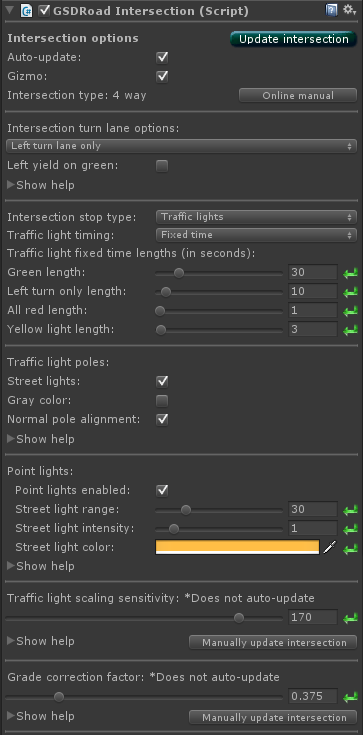
Intersection options
Auto-update Enables or disables auto updating of this intersection when changing options.
Gizmo Enables or disables most gizmo drawing on all objects related to this intersection.
Intersection turn lane options
No turn lanes - Creates an intersection with no turn lanes.
Left turn lane only - Creates an intersection with a left turn lane.
Both turn lanes - Creates an intersection with left turn and right turn lanes.
Left yield on green If checked, replaces the standard 3-light left turn light with a five-light yield on green left turn signal structure and sign.
Street lights If checked, attaches street lights to each intersection pole. Point lights optional and can be manipulated in the next option segment.
Gray color If checked, sets the traffic light pole base materials to gray galvanized steel. If unchecked the material used is black metal paint.
Normal pole alignment Recommended to keep this option on unless abnormal twisting of light objects is occurring. Turn this option off if the roads immediately surrounding your intersection are curved at extreme angles and cause irregular twisting of the traffic light objects. Turning this option off will attempt to align the poles perpendicular to the adjacent relevant road without any part existing over the main intersection bounds.
Point lights Enabled means that point lights for the traffic lights (and street lights, if enabled) will be turned on. This is accessible via script "isLightsEnabled"
If street pole lights enabled: Street light range, intensity and color: These settings directly correlate to the standard point light settings.
Traffic light scale sensitivity Increasing this value will increase the scaling sensitivity relative to the size of the intersection. Higher scaling value = bigger traffic lights at further distances. Default value is 170.
Grade correction If using extreme road grades immediately surrounding the intersection, terrain height matching errors may occur at the point of road expansion leading to the intersection.
Raise this value if you see terrain poking through the road at the road expansion areas.
Lower this value if you are not using road mesh colliders and notice dips at the expansion points.
Default value is 0.375 meters, which is the maximum value for a linear range of 0% to 20% grade.
Recommended to keep grades and angles small leading up to intersections.
= Reset to default value.
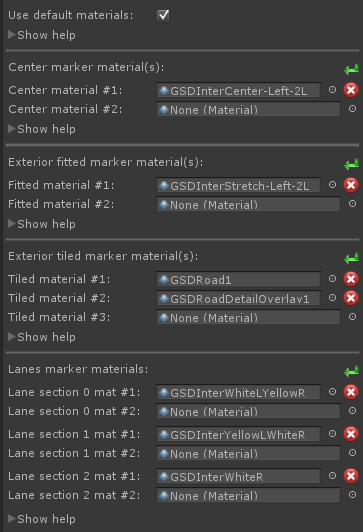
Intersection materials
Center marker materials Center marker materials require transparent shaders. Covers the center area of the intersection. Displayed in order #1 on bottom to #4 on top. Combine with transparent shaders which accept shadows to allow for easy marking. Each material added is rendered on top of the previous. Combine with transparent shaders which accept shadows to allow for easy marking.
Exterior fitted marker materials Fitted marker materials require transparent shaders. Covers the exterior area of the intersection with the UV's stretched to match at a 1:1 ratio. Should be use for intersection markings and any visual effects like dirt. Each material added is rendered on top of the previous. Combine with transparent shaders which accept shadows to allow for easy marking.
Exterior tiled marker materials Covers the exterior area of the intersection with the UV's tiled matching world coordinates. Tiled and used for road pavement textures. UV coordinates will match up seamlessly with road pavement. Each material added is rendered on top of the previous. Combine with transparent shaders which accept shadows to allow for easy marking.
Lanes marker materials Covers individual lane sections in the intersection. Used for high-definition line marking. Each material added is rendered on top of the previous. Combine with transparent shaders which accept shadows to allow for easy marking.
Lane section 0 Left side of the intersection where oncoming traffic travels. Use lane texture which matches the number of lanes used on the road system, with a white left line and a yellow right line.
Lane section 1 Left turn lane. Use a single lane texture with a yellow left line and a white right line.
Lane section 2 Right outgoing traffic lane. Use lane texture which matches the number of lanes used on the road system with a white right line.
Lane section 3 Right turn lane. Use a single lane texture with a white right line.
 = Reset to default value.