Gateway Troubleshooting - FLARE-forecast/flare-forecast.github.io GitHub Wiki
Verizon Global Modem USB730L
Verizon Global Modem USB730L - Linux Integration Guide
Verizon Global Modem USB730L - View Software Version
Verizon Global Modem USB730L - Software Update
Verizon Global Modem USB730L - Install Device Software Update
Verizon Global Modem USB730L - Sign in to the Admin Page
Verizon Jetpack MiFi 8800L
Verizon Jetpack® MiFi® 8800L - User Guide
Verizon Jetpack® MiFi® 8800L - View Software Version
Verizon Jetpack® MiFi® 8800L - Software Update
Verizon Jetpack® MiFi® 8800L - Update Firmware
Verizon Jetpack® MiFi® 8800L - Restore Settings to Factory Defaults
Check the Health Status of the System
Check if the USB modem ("Novatel Wireless") has been recognized
$ lsusb
Bus 002 Device 001: ID 1d6b:0003 Linux Foundation 3.0 root hub
Bus 001 Device 003: ID 8087:0a2b Intel Corp.
Bus 001 Device 002: ID 04b4:6570 Cypress Semiconductor Corp.
Bus 001 Device 004: ID 1410:9031 Novatel Wireless
Bus 001 Device 001: ID 1d6b:0002 Linux Foundation 2.0 root hub
The device number for "Novatel Wireless" should be a small number (004 here) and stay unchanged unless we reset the modem. If it keeps changing to larger numbers, it means the device is registering and unregistering frequently and that's a sign of connection instability.
Check the device derivers messages
$ dmesg
...
[    9.495311] cdc_ether 1-4:1.0 enx0015ff080733: renamed from eth0
...
Check if the modem network interface (enx0015ff030033 here) is loaded and have an IP address assigned to (100.97.156.57 here)
$ ip a
1: lo: <LOOPBACK,UP,LOWER_UP> mtu 65536 qdisc noqueue state UNKNOWN group default qlen 1000
    link/loopback 00:00:00:00:00:00 brd 00:00:00:00:00:00
    inet 127.0.0.1/8 scope host lo
       valid_lft forever preferred_lft forever
    inet6 ::1/128 scope host
       valid_lft forever preferred_lft forever
2: enp2s0: <NO-CARRIER,BROADCAST,MULTICAST,UP> mtu 1500 qdisc mq state DOWN group default qlen 1000
    link/ether 00:01:c0:20:56:c6 brd ff:ff:ff:ff:ff:ff
3: eno1: <BROADCAST,MULTICAST,UP,LOWER_UP> mtu 1500 qdisc mq state UP group default qlen 1000
    link/ether 00:01:c0:20:56:cc brd ff:ff:ff:ff:ff:ff
    inet 128.173.186.22/22 brd 128.173.187.255 scope global eno1
       valid_lft forever preferred_lft forever
    inet6 2001:468:c80:610b:201:c0ff:fe20:56cc/64 scope global dynamic mngtmpaddr
       valid_lft 2591938sec preferred_lft 604738sec
    inet6 fe80::201:c0ff:fe20:56cc/64 scope link
       valid_lft forever preferred_lft forever
4: wlp1s0: <NO-CARRIER,BROADCAST,MULTICAST,UP> mtu 1500 qdisc mq state DOWN group default qlen 1000
    link/ether 60:f6:77:df:23:07 brd ff:ff:ff:ff:ff:ff
5: ipop: <BROADCAST,MULTICAST,NOARP,UP,LOWER_UP> mtu 1280 qdisc fq_codel state UNKNOWN group default qlen 1000
    link/ether 62:d8:98:1b:f0:60 brd ff:ff:ff:ff:ff:ff
    inet 192.168.10.12/16 brd 192.168.255.255 scope global ipop
       valid_lft forever preferred_lft forever
    inet6 fd50:dbc:41f2:4a3c:b7e5:e403:6281:f1fd/64 scope global
       valid_lft forever preferred_lft forever
    inet6 fe80::60d8:98ff:fe1b:f060/64 scope link
       valid_lft forever preferred_lft forever
25: enx0015ff030033: <BROADCAST,MULTICAST,UP,LOWER_UP> mtu 1500 qdisc fq_codel state UP group default qlen 1000
    link/ether 00:15:ff:03:00:33 brd ff:ff:ff:ff:ff:ff
    inet 100.97.156.57/30 brd 100.97.156.59 scope global dynamic enx0015ff030033
       valid_lft 1289sec preferred_lft 1289sec
    inet6 2600:1003:b858:21fa:215:ffff:fe03:33/64 scope global dynamic mngtmpaddr noprefixroute
       valid_lft 86395sec preferred_lft 14395sec
    inet6 fe80::215:ffff:fe03:33/64 scope link
       valid_lft forever preferred_lft forever
If the cellular network interface gets an IP, it means the connection is established, even if internet activities are quite limited because of bad reception.
Check if you can ping Google
~$ ping 8.8.8.8
PING 8.8.8.8 (8.8.8.8) 56(84) bytes of data.
64 bytes from 8.8.8.8: icmp_seq=1 ttl=55 time=7.01 ms
64 bytes from 8.8.8.8: icmp_seq=2 ttl=55 time=7.02 ms
64 bytes from 8.8.8.8: icmp_seq=3 ttl=55 time=7.00 ms
Check Internet Connectivity Using a Specific Network Interface
$ ping -I <interface_name> 8.8.8.8
For instance:
$ ping -I enx0015ff025968 8.8.8.8
Check IPOP VPN Connectivity
$ ping 192.168.10.2
Check Signal Strength
Using Modem Admin Interface
On a web browser window, go to http://my.usb or http://192.168.1.1. Make sure you are not connected to any other internet connections such as WiFi or Ethernet.
Using Your Cellphone
How to measure signal strength in Decibels on your cell phone?
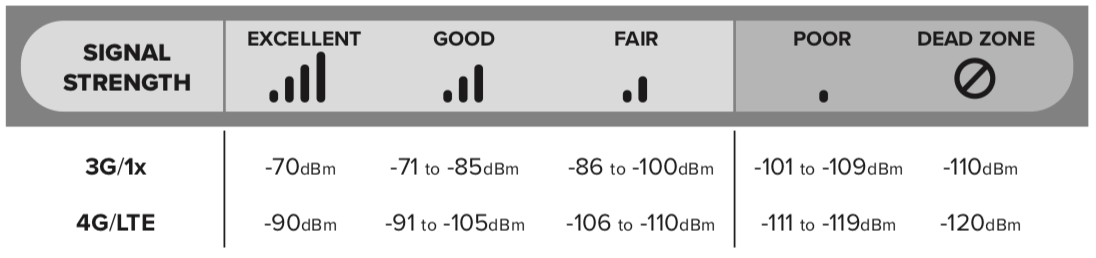
Check System Uptime
uptime
Bios Settings
Press the DEL or Esc key during the boot until the BIOS Setup appears.
Boot Menu
Press the F7 key during the boot until the Boot Menu appears.
Best Practices
- The USB730L modems should work out of the box without absolutely any configuration change. Trying to configure them may result in unstable connections.
- The USB730L modems won't work if the computer is connected to another network, WiFi or Ethernet, using an IP address in the range of 192.168.1.xxx.
- The gateway may not recognize the SD card after insertion. In that case, removing and reinserting that should fix the issue.
Unstable Connection in the Gateway Logs
In {gateway}-logs/monitor.log:
Bus 001 Device 021: ID 1410:9031 Novatel Wireless


[    5.621090] rndis_host 1-5:1.0 enx0015ff030033: renamed from eth0
[ 6562.165953] rndis_host 1-5:1.0 enx0015ff030033: unregister 'rndis_host' usb-0000:00:15.0-5, RNDIS device
[ 6563.174182] rndis_host 1-5:1.0 enx0015ff030033: renamed from eth0
[ 7052.144496] rndis_host 1-5:1.0 enx0015ff030033: unregister 'rndis_host' usb-0000:00:15.0-5, RNDIS device
[ 7053.153212] rndis_host 1-5:1.0 enx0015ff030033: renamed from eth0
[34592.535062] rndis_host 1-5:1.0 enx0015ff030033: unregister 'rndis_host' usb-0000:00:15.0-5, RNDIS device
[34593.523169] rndis_host 1-5:1.0 enx0015ff030033: renamed from eth0
[34701.657512] rndis_host 1-5:1.0 enx0015ff030033: unregister 'rndis_host' usb-0000:00:15.0-5, RNDIS device
[34702.648456] rndis_host 1-5:1.0 enx0015ff030033: renamed from eth0
[34714.815426] rndis_host 1-5:1.0 enx0015ff030033: unregister 'rndis_host' usb-0000:00:15.0-5, RNDIS device
[34715.633869] rndis_host 1-5:1.0 enx0015ff030033: renamed from eth0
[35132.129949] rndis_host 1-5:1.0 enx0015ff030033: unregister 'rndis_host' usb-0000:00:15.0-5, RNDIS device
[35133.150564] rndis_host 1-5:1.0 enx0015ff030033: renamed from eth0
[36989.499833] rndis_host 1-5:1.0 enx0015ff030033: unregister 'rndis_host' usb-0000:00:15.0-5, RNDIS device
[36990.518546] rndis_host 1-5:1.0 enx0015ff030033: renamed from eth0
[37277.771684] rndis_host 1-5:1.0 enx0015ff030033: unregister 'rndis_host' usb-0000:00:15.0-5, RNDIS device
[37278.762585] rndis_host 1-5:1.0 enx0015ff030033: renamed from eth0
[40010.899680] rndis_host 1-5:1.0 enx0015ff030033: unregister 'rndis_host' usb-0000:00:15.0-5, RNDIS device
[40011.892356] rndis_host 1-5:1.0 enx0015ff030033: renamed from eth0
[42134.685401] rndis_host 1-5:1.0 enx0015ff030033: unregister 'rndis_host' usb-0000:00:15.0-5, RNDIS device
[42135.687901] rndis_host 1-5:1.0 enx0015ff030033: renamed from eth0
[42180.935078] rndis_host 1-5:1.0 enx0015ff030033: unregister 'rndis_host' usb-0000:00:15.0-5, RNDIS device
[42181.773757] rndis_host 1-5:1.0 enx0015ff030033: renamed from eth0
[42500.973732] rndis_host 1-5:1.0 enx0015ff030033: unregister 'rndis_host' usb-0000:00:15.0-5, RNDIS device
[42501.975667] rndis_host 1-5:1.0 enx0015ff030033: renamed from eth0
[42942.265330] rndis_host 1-5:1.0 enx0015ff030033: unregister 'rndis_host' usb-0000:00:15.0-5, RNDIS device
[42943.286257] rndis_host 1-5:1.0 enx0015ff030033: renamed from eth0
[43202.728803] rndis_host 1-5:1.0 enx0015ff030033: unregister 'rndis_host' usb-0000:00:15.0-5, RNDIS device
[43203.685242] rndis_host 1-5:1.0 enx0015ff030033: renamed from eth0
[43974.757249] rndis_host 1-5:1.0 enx0015ff030033: unregister 'rndis_host' usb-0000:00:15.0-5, RNDIS device
[43975.757256] rndis_host 1-5:1.0 enx0015ff030033: renamed from eth0
[45255.760640] rndis_host 1-5:1.0 enx0015ff030033: unregister 'rndis_host' usb-0000:00:15.0-5, RNDIS device
[45256.742988] rndis_host 1-5:1.0 enx0015ff030033: renamed from eth0
[53867.602592] rndis_host 1-5:1.0 enx0015ff030033: unregister 'rndis_host' usb-0000:00:15.0-5, RNDIS device
[53868.627783] rndis_host 1-5:1.0 enx0015ff030033: renamed from eth0
Device number, 021 here, should be a small number such as 005 when the modem got recognized by the operating system. If it fails to register to the network and connect to the internet, it disconnects and reconnects. Every disconnection/reconnection increases the device number. So a large device number, 021 here, means the modem has disconnected and reconnected a lot which is caused by an unstable signal.
To check if the modem is recognized by the operating system, run the following command:
$ lsusb | grep Novatel
Bus 001 Device 021: ID 1410:9031 Novatel Wireless
Modem connection and disconnection is also reflected in the registering and unregistering rndis_host kernel module.
To check if te kernel module for the modem has been registered the device, run the following command:
dmesg | grep rndis_host
[    5.621090] rndis_host 1-5:1.0 enx0015ff030033: renamed from eth0
[ 6562.165953] rndis_host 1-5:1.0 enx0015ff030033: unregister 'rndis_host' usb-0000:00:15.0-5, RNDIS device
[ 6563.174182] rndis_host 1-5:1.0 enx0015ff030033: renamed from eth0
[ 7052.144496] rndis_host 1-5:1.0 enx0015ff030033: unregister 'rndis_host' usb-0000:00:15.0-5, RNDIS device
[ 7053.153212] rndis_host 1-5:1.0 enx0015ff030033: renamed from eth0
[34592.535062] rndis_host 1-5:1.0 enx0015ff030033: unregister 'rndis_host' usb-0000:00:15.0-5, RNDIS device
[34593.523169] rndis_host 1-5:1.0 enx0015ff030033: renamed from eth0
[34701.657512] rndis_host 1-5:1.0 enx0015ff030033: unregister 'rndis_host' usb-0000:00:15.0-5, RNDIS device
[34702.648456] rndis_host 1-5:1.0 enx0015ff030033: renamed from eth0
[34714.815426] rndis_host 1-5:1.0 enx0015ff030033: unregister 'rndis_host' usb-0000:00:15.0-5, RNDIS device
[34715.633869] rndis_host 1-5:1.0 enx0015ff030033: renamed from eth0
[35132.129949] rndis_host 1-5:1.0 enx0015ff030033: unregister 'rndis_host' usb-0000:00:15.0-5, RNDIS device
[35133.150564] rndis_host 1-5:1.0 enx0015ff030033: renamed from eth0
[36989.499833] rndis_host 1-5:1.0 enx0015ff030033: unregister 'rndis_host' usb-0000:00:15.0-5, RNDIS device
[36990.518546] rndis_host 1-5:1.0 enx0015ff030033: renamed from eth0
[37277.771684] rndis_host 1-5:1.0 enx0015ff030033: unregister 'rndis_host' usb-0000:00:15.0-5, RNDIS device
[37278.762585] rndis_host 1-5:1.0 enx0015ff030033: renamed from eth0
[40010.899680] rndis_host 1-5:1.0 enx0015ff030033: unregister 'rndis_host' usb-0000:00:15.0-5, RNDIS device
[40011.892356] rndis_host 1-5:1.0 enx0015ff030033: renamed from eth0
[42134.685401] rndis_host 1-5:1.0 enx0015ff030033: unregister 'rndis_host' usb-0000:00:15.0-5, RNDIS device
[42135.687901] rndis_host 1-5:1.0 enx0015ff030033: renamed from eth0
[42180.935078] rndis_host 1-5:1.0 enx0015ff030033: unregister 'rndis_host' usb-0000:00:15.0-5, RNDIS device
[42181.773757] rndis_host 1-5:1.0 enx0015ff030033: renamed from eth0
[42500.973732] rndis_host 1-5:1.0 enx0015ff030033: unregister 'rndis_host' usb-0000:00:15.0-5, RNDIS device
[42501.975667] rndis_host 1-5:1.0 enx0015ff030033: renamed from eth0
[42942.265330] rndis_host 1-5:1.0 enx0015ff030033: unregister 'rndis_host' usb-0000:00:15.0-5, RNDIS device
[42943.286257] rndis_host 1-5:1.0 enx0015ff030033: renamed from eth0
[43202.728803] rndis_host 1-5:1.0 enx0015ff030033: unregister 'rndis_host' usb-0000:00:15.0-5, RNDIS device
[43203.685242] rndis_host 1-5:1.0 enx0015ff030033: renamed from eth0
[43974.757249] rndis_host 1-5:1.0 enx0015ff030033: unregister 'rndis_host' usb-0000:00:15.0-5, RNDIS device
[43975.757256] rndis_host 1-5:1.0 enx0015ff030033: renamed from eth0
[45255.760640] rndis_host 1-5:1.0 enx0015ff030033: unregister 'rndis_host' usb-0000:00:15.0-5, RNDIS device
[45256.742988] rndis_host 1-5:1.0 enx0015ff030033: renamed from eth0
[53867.602592] rndis_host 1-5:1.0 enx0015ff030033: unregister 'rndis_host' usb-0000:00:15.0-5, RNDIS device
[53868.627783] rndis_host 1-5:1.0 enx0015ff030033: renamed from eth0
Failing to Push to GitHub in the Gateway Logs
In {gateway}-logs/git.log:
############################ carina - 10/08/20 14:05:01 EST ############################

Data:

Already up to date.
[fcre-metstation-data 2fa196e] 10/08/20 14:05:01 EST: Git Backup
 2 files changed, 720 insertions(+)
ssh: Could not resolve hostname github.com: Name or service not known
fatal: Could not read from remote repository.

Please make sure you have the correct access rights
and the repository exists.

Logs:

ssh: Could not resolve hostname github.com: Name or service not known
fatal: Could not read from remote repository.

Please make sure you have the correct access rights
and the repository exists.
[carina-logs 65ec941a] 10/08/20 14:05:01 EST: Logs
 5 files changed, 973 insertions(+)
ssh: Could not resolve hostname github.com: Name or service not known
fatal: Could not read from remote repository.

Please make sure you have the correct access rights
and the repository exists.
[carina-logs cb3410b8] 10/08/20 14:05:01 EST: Logs
 1 file changed, 7 insertions(+)
ssh: Could not resolve hostname github.com: Name or service not known
fatal: Could not read from remote repository.

Please make sure you have the correct access rights
and the repository exists.

############################ carina - 10/08/20 20:05:01 EST ############################

Data:

Already up to date.
[fcre-metstation-data 84697ed] 10/08/20 20:05:01 EST: Git Backup
 2 files changed, 720 insertions(+)
packet_write_wait: Connection to 140.82.113.4 port 22: Broken pipe
fatal: The remote end hung up unexpectedly
fatal: The remote end hung up unexpectedly

Logs:

Already up to date.
[carina-logs c1eadc0f] 10/08/20 20:05:01 EST: Logs
 3 files changed, 848 insertions(+)
packet_write_wait: Connection to 140.82.112.4 port 22: Broken pipe
fatal: The remote end hung up unexpectedly
fatal: The remote end hung up unexpectedly
Clear up Disk Space on Gateways
This should be done automatically on the gateways. But, in case it is needed to be done manually:
1- Attach the gateway to an LCD and keyboard.
2- Open the Terminal. (Shortcut: CTRL + SHIFT + T)
3- Check the disk space usage on the data disk:
df -h /dev/sda1
4- Run the following commands in the Terminal to get rid of unnecessary residual files in the local Git repo, for instance fcre-metstation-data:
cd /data/fcre-metstation-data
git gc --prune
It may take a while to get finished.
5- Check the disk space usage on the data disk again:
df -h /dev/sda1