Quirc Examples - EyesOfThings/Software GitHub Wiki
Index
Introduction
This application runs several examples using the Quirc library. For each test, the output will be the number of QR codes detected and their content. If an error occurs, the output will display its type.
The content of the testFiles folder must be copied to the SD card (/mnt/sdcard/) resulting in /mnt/sdcard/QuircTest/.
To obtain information about the used QR Codes, some QR Codes have been uploaded to here.
Examples and expected output
Test 1
This example is a basic test. The image contains a unique QR code, without margins on the sides. The main purpose is to check the proper behavior of the library.
Files required:
- File: /mnt/sdcard/QuircTest/TestQR.png
The image size is 150 x 150 px.
images/test1.png

In this example, the output is:
UART: Test 1
UART: num_codes: 1
UART: Data: EoT
UART: ----------------
Test 2
Second test image contains a QR Code and text. The main purpose is to check if Quirc library distinguish between QR Codes and text, decoding the code and ignoring the text.
In contrast to Test 1, this image has margins. In this way, we can know if Quirc looks for the QR Code.
Files required:
- File: /mnt/sdcard/QuircTest/TestTex.png
The image size is 490 x 490 px.

The output of the Test 2 is:
UART: Test 2
UART: num_codes: 1
UART: Data: http://www.qrdroid.com
UART: ----------------
Test 3
Just as Test 1, in Test 3 we will use an image without margins and its content will be a unique QR Code. As opposed to Test 1, the test image size is 500 x 500 px. Test 3 has as its objective to verify if Myriad can use Quirc library to decode images with this size.
Files required:
- File: /mnt/sdcard/QuircTest/Test500x500.png
images/test3.png

The output is:
UART: Test 3
UART: num_codes: 1
UART: Data: EoT 500 x 500 px
UART: ----------------
Test 4
The previous tests used images without rotation. Therefore, the main purpose is to check if Quirc library can decode rotated QR codes. In this case, the image size is 300 x 300 px.
Files required:
- File: /mnt/sdcard/QuircTest/TestRotated.png
images/test4.png

The output of Test 4 is:
UART: Test 4
UART: num_codes: 1
UART: Data: Rotated Code EoT
UART: ----------------
Test 5
Test 5 is an expansion of Test 4. Once again, the QR Code is rotated, but in Test 5 rotation is greater than Test 4. Test 5 has as its objective to verify if rotation affects the recognition and decoding.
Files required:
- File: /mnt/sdcard/QuircTest/TestRotatedError.png
The image size is 225 x 225 px.
images/test5.png

The output is:
UART: Test 5
UART: num_codes: 1
UART: Data: ECC failure
UART: ----------------
Even though the example recognizes a QR Code, Quirc library cannot decode it.
Test 6
In this test, the QR Code will be red. The main objective is to check if Quirc library can recognize different colors. The image size is 50 x 50 px.
Files required:
- File: /mnt/sdcard/QuircTest/TestRedCode.png

The output is:
UART: Test 6
UART: num_codes: 1
UART: Data: Red Code EoT
UART: ----------------
Test 7
This test aims at verifying that the Quirc port can recognize and decode several codes in the same image. The test image contains two QR Codes, one is rotated.
Files required:
- File: /mnt/sdcard/QuircTest/TestTwoQR.png
The image size is 400 x 300 px.
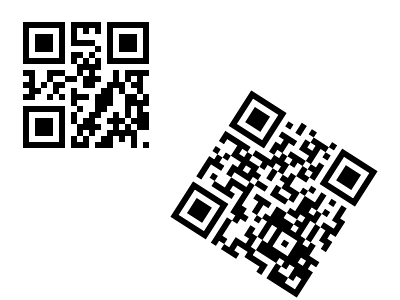
The output of Test 7 is:
UART: Test 7
UART: num_codes: 2
UART: Data: EoT Data: http://eyesofthings.eu/
UART: ----------------
Test 8
The main purpose of this test is to check if the Quirc library port can work with very small sizes. The test image size is 25 x 25 px.
Files required:
- File: /mnt/sdcard/QuircTest/TestTooSmall.png
The output is:
UART: Test 8
UART: num_codes: 1
UART: Data: Invalid version
UART: ----------------
Like that test 5, Quirc library detects a QR Code, but the library cannot decode it. In this case, the error is different.
Benchmark
The following table shows the times in the execution of example program. For each test, there are 3 times: Time in loadCode (reads the image and creates the necessary structures), time in readQR (detects and reads the information) and total time.
From these times, we can draw the following conclusions:
- As expected, method loadCode uses most of the time.
- The higher image size, the higher time.
- The higher number of QR codes, the higher time to decode QR code.
Dependencies
- SDCardIO
- libpng
- Quirc