EPuck2 Presenting the EPuck2 - EPFL-MICRO-315/TPs-Wiki GitHub Wiki
⚠ wiki page used in TP Intro
EPuck2's Presentation
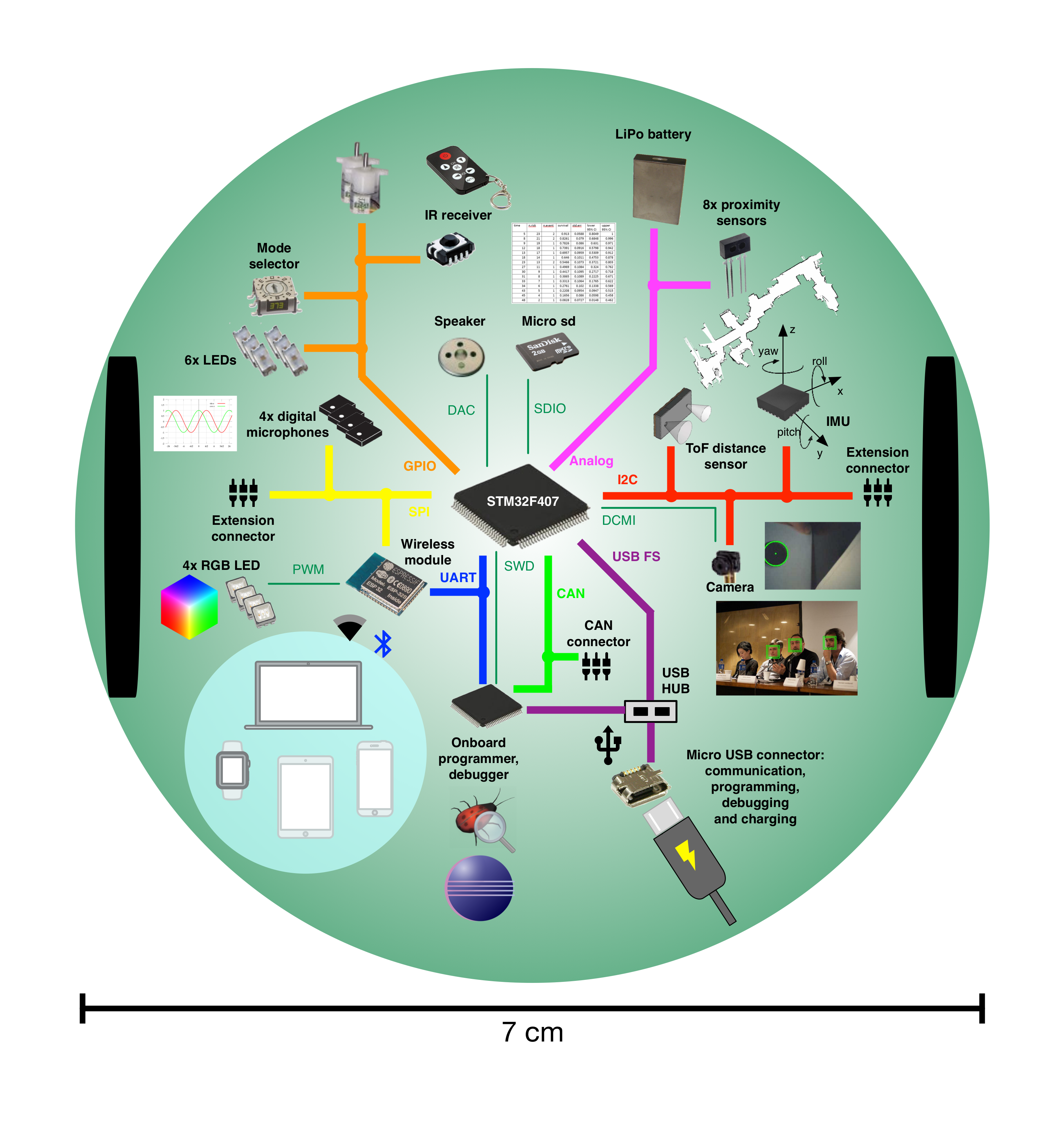
The EPuck2 robot is not just a robot with many actuators and sensors; it also incorporates a USB Hub, a programmer and multiple internal interconnections offering a really interesting compact system.
To get a better detailled idea, see:
💠 EPuck2's Block diagram
- Below is a picture (based on https://www.gctronic.com/doc/images/e-puck2-overview.png but modified - VSCode replacing Eclipse) that summarizes the main components of the robot:
💠 EPuck2's Main features
- Among those components, 4 are particuliary important:
STM32F407: main MCU managing sensors and actuatorsSTM32F413: MCU used as a programmer/debuggerESP32: MCU with Bluetooth and WIFI capabilities acting as a radio module. It also manages 4 RGB leds (12 GPIOs) and the User button in order to meet the limited number of GPIOs of the STM32F407.USB Hub: connecting the USB ports of STM32F407 and STM32F413 (each 1) to the USB connector
- In the context of this course, the code you will produce will be intended to run on the main mcu: the
STM32F407 - More details here
💠 EPuck2's Important precautions
- The Epuck2 robot has 2 USB connectors but ONLY one must be used at time. More details here
- The battery must NEVER be removed. It has a very precise spatial orientation so as not to force mechanically at the risk of breaking the injected plastic frame, or of bending the contact tabs.
💠 EPuck2's Power on/off
- The EPuck2 connected via USB to a computer, only the programmer (STM32F413), the battery charger and the USB Hub are automatically powered from the USB source, the battery being charged if necessary.
- To supply the rest of the robot (including the STM32F407 main MCU and the radio module) press the
Power button - This power-up is also done automatically by the programmer when asked to program the STM32F407, thus avoiding problems for the user
- More details here
💠 EPuck2's State LEDs indicator
- Several dedicated LEDs indicate the states of various functions specific to the robot, such as:
- State of the battery charge
- USB connection
- Communications
- A detailed description can be found here
💠 EPuck2 un/boxing
In order to keep the material in a good state and robust to potential falls, you can check out the right way of (un)boxing the EPuck-2 robot through this video.