Transparency Sorting Fix - Delt06/urp-toon-shader GitHub Wiki
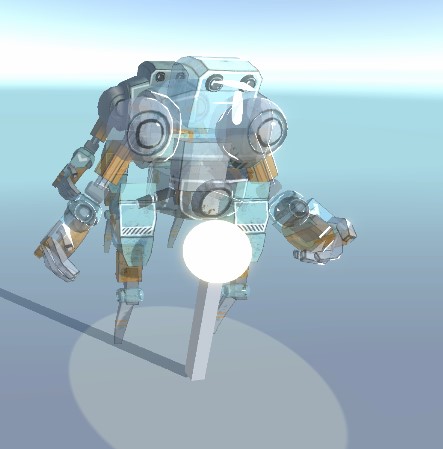
When working with complex transparent objects, you may encounter sorting issues. This happens because the order in which the mesh parts are drawn is not under your control; therefore, it can be arbitrary.
| Sorting Issue | Sorting Issue Fixed |
|---|---|
 |
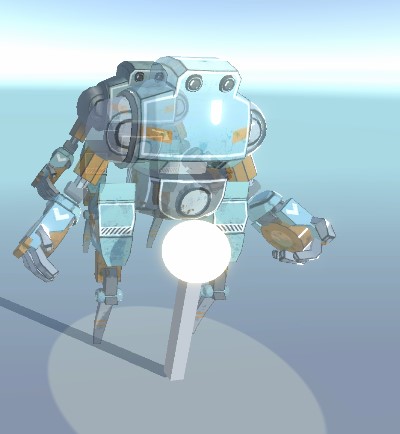 |
It is possible to fix via the so-called Depth Pre-Pass. It means that even though the object is transparent, we can write it to the depth buffer to ensure only the topmost geometry will be drawn during the transparent pass.
To enable the Depth Pre-Pass, locate your renderer asset.
By default, it should be named UniversalRenderPipelineAsset_Renderer.
In the Inspector, click Add Renderer Feature/Render Objects.
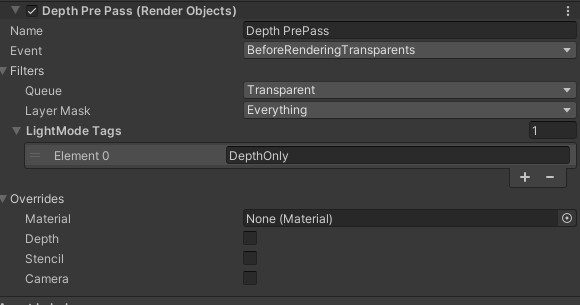
Configure the pass as follows. Note:
- The name of the pass can be any.
- You can set the
Layer Maskto limit the effect to particular objects only. - The
LightMode Tagsshould be as specified.DepthOnlyis the name of the pass, which is implemented to only write to the depth buffer.