C: Basic Operations in Rhino - DavidJenny/Digitales-Entwerfen-ZHAW GitHub Wiki
Here you can find a summary of basic Rhino operations.
Additional information on specific commands can be found in Mcneel Docs.
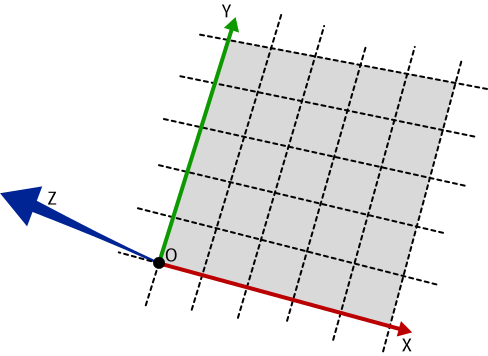 Coordinate System

 Curves
Rhino has multiple types of curves available, which have different characteristics.

The
control pointsandknotsalso define the shape of the curve and respond differently depending on the degree of the curve.

| Element | Description |
|---|---|
| Degree | Indicates the complexity of the math functions of the curve. It is normally 1, 2, 3, or 5. Lines and polylines have a degree of 1; circles and ellipses have a degree of 2; free-form curves are usually represented as degree-3 or 5 NURBS curves. |
| Control points | Facilitate the adjustment of curve shapes. |
| Knots | Are automatically generated by Rhino and related to the mathematical representation of curves. More can be added to modify the weight angle of the curve. |
The control points and degree of the curves can be modified using
Rebuild.It is also possible to separate curves and polylines using
Explode.

It is also possible to make
Arc,Circle,Polygon,Rectangle,Ellipse,Parabola... Among other curve-based geometries.

 Surfaces
Rhino creates surfaces using mathematically defined, infinitely thin and flexible NURBS (Non-Uniform Rational B-Splines) geometry.
NURBS surfaces have a direction and contain Iso-Curves in the 2 directions of the grid (U and V). It is possible to reduce or increase the quantity of iso-curves with the
Rebuildcommand, it is also possible to extract them from specific places using the commandExtractIsocurve.

NURBS surfaces can be open or closed.

The faces can also be selected using
ExtractSrf.Surfaces can be closed using
Capwhen the hole is planar.

There are multiple Primitives (basic shapes) available in Rhino. These can be created using their respective commands. There is also the option of creating
Extrusions, modifying the position of the faces usingPushPullor creating aShellfrom an existing geometry.

Boolean Operations allow merging
BooleanUnion, extractingBooleanDifference, extracting the intersectionBooleanIntersection, and splittingBooleanSplitbetween 2 geometries.


