ToolBox - CyberMind-FR/secubox-deb GitHub Wiki
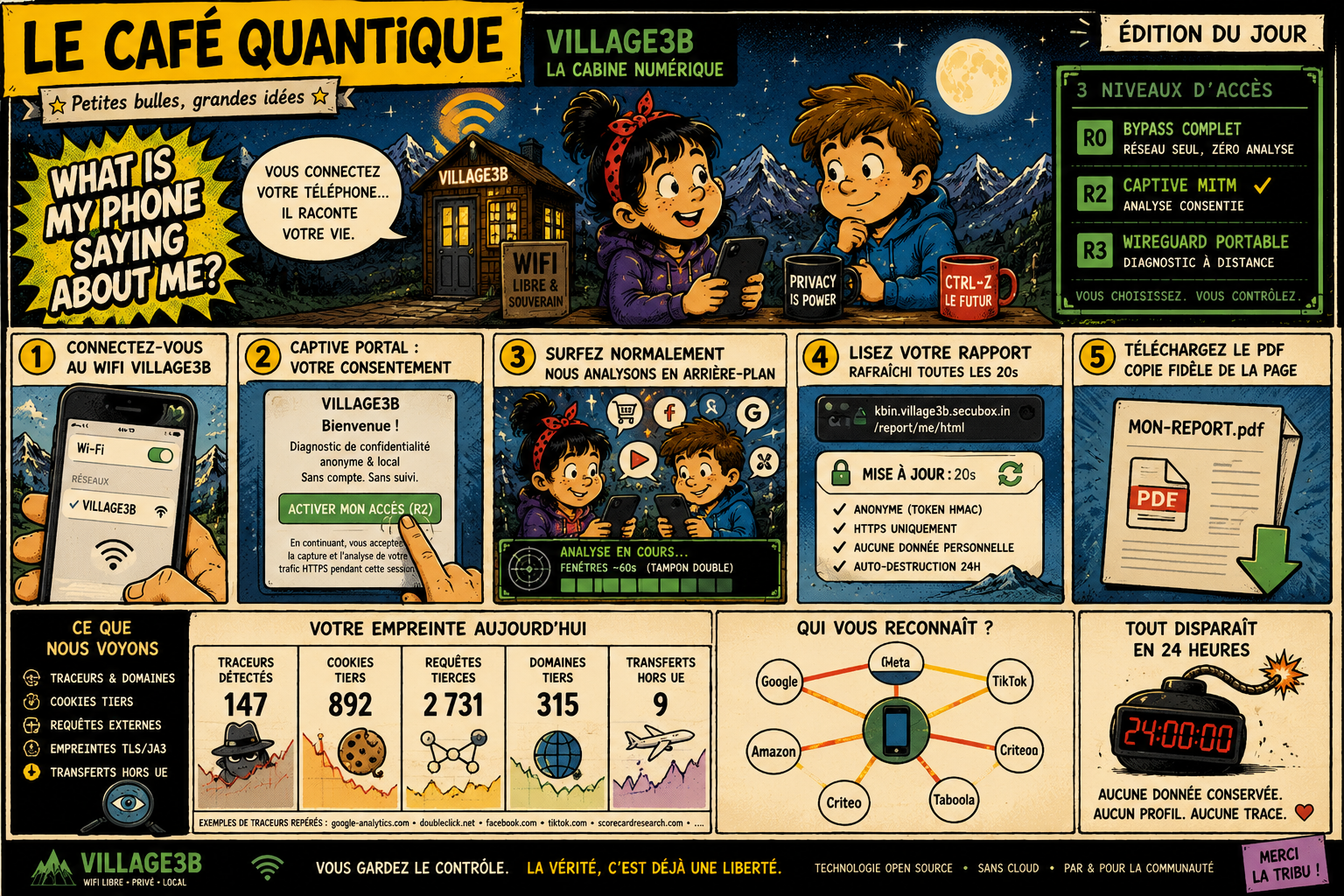
🟣 MIND · 🟡 WALL — a public SecuBox access point that shows any passer-by, in plain language, exactly what their phone leaks on the network — then hands them an ephemeral, anonymous report they can keep.
The ToolBox is a self-contained cabine numérique: an open Wi-Fi SSID
(e.g. VILLAGE3B) on an isolated sandbox subnet, a captive portal with
explicit R2 consent, a transparent MITM inspection pipeline, and a live
privacy report served at kbin.<board>.secubox.in. Nothing is tied to a
real identity — the client MAC is hashed with a daily-rotating salt and all data
expires within 24 h.
- Package:
secubox-toolbox· FastAPI/Uvicorn portal on:8088 - Companion app: Android-ToolBox 📱 one-tap R3 onboarding
- Doctrine: OPAD + R2-consented egress (CSPN) — no TLS-break without opt-in
-
Connect to the open
VILLAGE3BSSID. The captive portal greets you. - Consent (R2) — one tap "Activer mon accès" is the logged opt-in. Without it, traffic is relayed but not decrypted.
- Surf normally. The cabine classifies your egress (trackers, DPI, cookies, TLS fingerprints) in the background — double-buffered, ~60 s windows.
-
Read your report —
kbin.<board>.secubox.in/report/me/html, refreshed every 20 s, or download the PDF (a faithful copy of the web page). - Everything self-destructs within 24 h. The report link is an anonymous HMAC-sealed token.
Typical settings: a maker-space, a library, a festival stand, a classroom — a place where people can see surveillance capitalism happening on their own device, with no account and no tracking of their own.
| Level | Name | What it does |
|---|---|---|
| R0 | 🌐 Open | No analysis. Plain relay. |
| R1 | 🛡 Passive | Passive analysis, no banner (recommended default). |
| R2 | 🔍 Consented | Analysis + in-page transparency banner (explicit TLS-break). |
| R3 | 🧅 Tunnel | Full WireGuard tunnel (wg-toolbox) — mobile clients onboard via the app; the DPI engine sees real egress + media. |
The report's 🔀 Mon niveau de protection card lets the visitor switch level live.
The report is the heart of the ToolBox. Same data model in the live HTML page and the downloadable PDF — the PDF is a faithful mirror, not a stripped-down export. Three tabs: 🍪 Pistage, 🛰️ DPI-Exfil, 🌍 Overall.
A cyberpunk fiche de personnage that maps the visitor's live telemetry onto RPG stats — the friendly face of the analysis:
-
⚡ Caractéristiques — DÉFENSE / DISCRÉTION / RIPOSTE / INTEL, each shown as
pips
●●●○○○with a value and a note (e.g. "312 pubs tuées", "4 cat · 27 flux"). - 🎒 Inventaire · protections — active defences as ✓/✗ chips (Tor tunnel, MITM cert, WireGuard R3, ad-blocker).
- 🐉 Bestiaire · qui te traque — the top trackers following you across sites.
-
⚔️ Quêtes en cours · menaces — live threats from the DPI engine, each with
its destination and detail (e.g.
🗡️ NEW CLOUD — AWS S3 · première sortie,🗡️ BEACONING — Google LLC · 15 flux périodiques (~26.9 s)), or a "zone sûre" all-clear. - 🧬 ICE / Exposition / XP bars summarise integrity, exposure (0–100), and the volume exchanged over 7 days.
Verdict-first exposure gauge (0–100) plus En un coup d'œil: a trackers donut,
a countries bar chart (where your data goes), and a most-tracked-sites chart.
Deep-technical cards (compromise scoring, threat-intel / DGA / beaconing, contacted
hosts, cookie providers, device fingerprint, cert-pinned apps, inspection
transparency) are collapsed into <details>.
Four donuts of what this device sends out over the tunnel, classified by the DPI engine: service categories (☁️ cloud / 📦 file-host / 💬 messaging / 🤖 AI / 🎬 media / …), protocols, exfiltration alerts, and top destinations, plus KPIs (flows, ⬆️ Mo sent, ⬇️ Mo received, alerts).
Two complementary views, deliberately distinct:
-
Service category
media— streaming services recognised by SNI (Netflix, YouTube, Spotify…), inside the DPI categories donut. -
Captured MIME types — the real
Content-Typethe MITM sees in R4/analyst mode (📺 video / 🎵 audio / 🎞️ HLS·DASH manifests /▶️ video pages), with a top-hosts table. Populated once you browse a video/audio through the tunnel.
The same four DPI donuts aggregated board-wide (all devices behind R3) — for spotting anomalous usage at the network scale.
The operator console lives in the admin interface (/toolbox/); every tab is a
standalone page in the common Aurora reference style (tiles, charts, tables),
refreshed automatically and never while you are typing or confirming an action.
All admin writes are refused on the public kbin vhost and from a
wg-toolbox tunnel peer: they only work from the authenticated admin interface.
Every action below asks for a confirmation inside the page and shows its
result next to the button.

Demonstration screenshots: fictitious data, flagged by an orange banner on the page.
| Tab | What it shows | Actions |
|---|---|---|
| Vue d'ensemble | Network throughput (24 h), clients per level R0–R3, events per source, blocked ads/trackers, network drops, service status, latest detections, latest clients | none (read-only) |
| Clients | Every device (identified by a hash of its MAC, never the address), level, state, details | change level, reset statistics, forget clients |
| Filtres MITM | Which hosts escape decryption: TLS passthrough (pinned apps), legacy bypass patterns, auto-learned proposals | toggle/delete a filter, splice whitelist, promote/ignore a proposal |
| Cartographie sociale | Who talks to whom: trackers, CDN/edge networks, anti-bot, operator-grade surfaces, most exposed devices (24 h) | quarantine a device |
| Pubs | Ad blocking and ad networks: blocked per hour, active lists, ranking of ad hosts, visitors | Ad-Guard switch |
| Réseau | Frames the SOC page Réseau en direct — one single source for live network data | see Admin-Panels-Gallery |
| Tor | Tor circuit, exit country, VPN clients, bridges, hidden services | see below |
| Sentinelle | Fleet verdict, detections by threat type, timeline, learned C2 hosts | ignore a C2 host |
| Config | Default level, options, certificate fingerprints (never private keys), policies, linked services, exports | none (read-only) |
| Action | Effect | API |
|---|---|---|
| Level R0–R3 (per client) | Forces the client's level in the store | POST /admin/clients/{h}/level |
| RAZ des statistiques (one client, or all) | Wipes events, consents, reports, social graph and score. The client row is kept, so the client stays in the list, level included |
POST /admin/clients/{h}/reset, POST /admin/clients/reset-all
|
| Oublier (one client) | Removes the row and its events, consents, reports and social graph. The client reappears with its activity if it reconnects | POST /admin/clients/{h}/forget |
| Oublier les inactifs (30 j) | Same, for clients not seen for 30 days |
POST /admin/clients/forget {"inactive_days": 30}
|
| Oublier tous les clients | Empties the list; the chosen R level is lost |
POST /admin/clients/forget {"inactive_days": 0}
|
RAZ is not "forget". After a reset the list is unchanged and only the statistics are empty ("N clients reset and kept"). Use forget to shrink the list. Network access never depends on this table. Any other value for
inactive_daysis refused (422) and nothing is deleted.

- Filters — enable/disable or delete a rule. A rule shipped with the package is disabled rather than deleted (it cannot be removed).
- Splice whitelist — hosts passed through without TLS interception (e.g. an app that pins its certificate). Add a host to exempt it; Re-soumettre puts it back under MITM analysis. Effect is immediate.
- Auto-learned proposals — hosts the engine suggests for the whitelist: promote adds them, ignore dismisses them.
Known limits stated on the page: no per-filter counter.

The relation graph shows trackers and networks by volume; the API does not say
which device talks to which tracker (the edge table is not exposed). The only
action is Quarantine on an exposed device: all its traffic is cut for 6 h
(POST /admin/quarantine/{ip}), after a confirmation.

Most ads are killed at DNS, before the MITM engine, so the "204" counter only measures what gets past DNS. The single write action is the Ad-Guard switch (DNS sinkhole plus cosmetic filtering at R3), independent of the R levels: turning it off removes ad blocking for all clients. See DNS-Filtrage.

Sends client traffic out through Tor without losing inspection (ad blocking, banner, safe browsing). It is fail-closed: no clear-text fallback.
| Action | What it does |
|---|---|
Activer / Désactiver (preset anonymous, stealth with bridges, minimal SOCKS) |
Flips the Tor mode flag; the tunnel is armed a few seconds later by the reconciler |
| Nouvelle identité | Requests a new circuit (new exit IP) |
| Vérifier l'IP de sortie | Leak probe through the SOCKS port |
| Pays de sortie | Replaces the whole list of exit countries (ISO codes); clear means any country |
| Clients Tor-VPN | Selective routing of ports 80/443 for chosen clients (add/remove) |
| Ponts obfs4 | Anti-censorship bridges (add/remove a bridge line) |
| Émancipation | Publishes the admin interface as a .onion hidden service; lists hidden services and the .onion DNS state |
Tor actions are audited server-side. The validity of the CA and the current exit country are not provided by the API and are not shown.

Spyware, command-and-control (C2) channels and malware seen in the devices' traffic: fleet verdict (clean / suspicious / compromised), threat-type breakdown, timeline and recent detections. The one action is Ignorer on a learned C2 host (adds it to the allow list, after confirmation).
Read-only: options in force, certificate fingerprints, quarantine and R-level policies, linked modules, and export links. The raw configuration is served by the admin API (session required).
| Method | Path | Description |
|---|---|---|
| GET | /report/me/html |
Live HTML report (?mh=<hash> for R3/remote clients) |
| GET | /report/me |
Same report as a PDF |
| GET | /report/{token} |
HMAC-sealed ephemeral PDF (24 h) |
| POST | /change-level |
Switch R0/R1/R2 |
| GET | /wg/toolbox.apk |
Android companion (see Android-ToolBox) |
All report rendering runs off the event loop, serialized, and short-cached, so a heavy PDF (or a retry storm) can never wedge the portal.
- MAC hashing with a daily-rotating salt — no session ↔ identity mapping kept.
- R2 = explicit consent only — the opt-in click is the logged proof; no consent, no TLS-break.
-
TLS-break only on the captive subnet (
10.99.0.0/24) — the rest of the LAN is untouched. - 24 h retention — hashes, events, and report links all expire; raw logs are dropped at session end.
- Open by default — no ads, no resale; a digital commons (CyberMind / Gérald Kerma, Savoie).
- Android-ToolBox — one-tap R3 onboarding companion
- Anti-Track — the tracker blocking / poisoning / anonymisation engine
- Browser-Extension — desktop social-graph cartography
- Architecture — where the ToolBox sits in the six-module stack
- DNS-Filtrage — Ad-Guard, the DNS sinkhole behind the Pubs tab
- NAC — network access control and zones
- Admin-Panels-Gallery — the common Aurora panel style and the SOC views