Deliveries - CristoRodriguez1/Rappiteca GitHub Wiki
Delivery 1
Rappiteca is a standalone, self-contained web application. It is not a component of a larger system and does not depend on or integrate with any pre-existing institutional platform. Users and administrators interact with Rappiteca directly through their own accounts created within the system.
The software operates under the following constraints:
a) System interfaces: Rappiteca does not interface with external systems. All functionality is self-contained within the application.
b) User interfaces: Rappiteca is accessed through a responsive web interface, usable from desktop and mobile browsers. Two main interface views exist: a user-facing interface and an administrator dashboard.
c) Hardware interfaces: No specialized hardware is required. All operations are performed manually through the web interface; no barcode or QR code scanners are used.
d) Software interfaces: Rappiteca relies on a relational database management system to store and manage catalog, user, loan, and fine data. It uses Python with the Django framework for the application logic.
e) Communications interfaces: The system communicates over standard HTTP/HTTPS protocols. Notifications (due date reminders, overdue alerts, availability, and fine notifications) are delivered through in-app notifications and email (SMTP).
f) Memory: Not applicable / no specific memory constraints beyond standard web hosting requirements.
g) Operations: The system is expected to be available for continuous, unattended operation (24/7), with scheduled/automated processes (e.g., overdue checks, notification triggers) running periodically in the background.
h) Site adaptation requirements: No special site adaptation is required, as the system is accessed entirely through a web browser.
Rappiteca provides the following main functions:
- User account management: Allows users and administrators to register, log in, and manage their profile information.
- Book catalog management: Allows users to search and browse the book catalog by title, author, category, or ID, and view real-time availability status and book details. Allows administrators to add, edit, and remove books from the inventory.
- Loan management: Allows users to request loans, renew active loans, reserve unavailable books, cancel reservations, and view their active loans and loan history.
- Notification management: Automatically notifies users about due dates, overdue loans, book availability (for reservations), and applicable fines, through in-app notifications.
- Fine management: Automatically calculates and applies fines for overdue loans, and allows administrators to track payment status.
- Loan traceability and reporting: Allows administrators to trace who currently holds each book, monitor due dates and overdue items, manage registered users, and generate reports.
Rappiteca is intended for two main types of users:
Library users: Users are expected to have basic computer literacy and familiarity with web applications, such as browsing websites and filling out online forms. No specialized technical knowledge is required. Users may have varying levels of experience with digital library systems, ranging from frequent users to first-time users, so the interface must be intuitive and easy to navigate without prior training. Administrators: Administrators are expected to have basic to intermediate computer literacy and some familiarity with library management processes (cataloging, loan policies, fine calculation). While they do not require technical/programming expertise, they are expected to be trained on how to use the system's administrative dashboard, given the greater responsibility and impact of their actions (e.g., inventory changes, fine management).
Both user types are assumed to have reliable access to a computer or mobile device with an internet connection and a modern web browser.
a) Regulatory policies: Not applicable. Rappiteca is an academic project and is not subject to specific regulatory or industry compliance policies.
b) Hardware limitations: Not applicable, since no specialized hardware is used. The system only requires standard hosting infrastructure and devices with a modern web browser.
c) Interfaces to other applications: Not applicable, since Rappiteca is a standalone system with no integration with external applications or platforms.
d) Parallel operation: The system must support multiple users (regular users and administrators) accessing and performing operations concurrently (e.g., simultaneous searches, loan requests, and inventory updates) without data inconsistency.
e) Audit functions: The system shall keep a record of administrator actions (e.g., inventory changes, fine management) through an admin activity log, to support traceability of critical operations.
f) Control functions: Access to administrative functions (inventory control, fine management, user management, reports) shall be restricted to users with the administrator role.
g) Signal handshake protocols: Not applicable, as the system does not use low-level communication protocols; all communication is handled over standard HTTP/HTTPS.
h) Quality requirements: The system shall be reliable and available, ensuring accurate, real-time tracking of book availability and loan status to prevent conflicts (e.g., two users borrowing the same copy simultaneously).
i) Criticality of the application: Rappiteca is not a safety-critical or life-critical application. However, it is important for the continuity of the library's daily loan operations, so extended downtime would negatively affect users and administrators.
j) Safety and security considerations: The system shall protect user account information (e.g., passwords) and restrict access to sensitive administrative functions through role-based authentication.
k) Physical/mental considerations: Not applicable beyond standard usability and accessibility good practices.
Requirements are written using EARS syntax (Easy Approach to Requirements Syntax): each statement follows a fixed pattern (THE system SHALL..., IF... THEN THE system SHALL..., WHILE... THE system SHALL..., AFTER... THE system SHALL...) so that every requirement is unambiguous, singular, and verifiable, per the characteristics defined for this specification.
Priority follows MoSCoW: Must, Should, Could, Won't.
| ID | Requirement | Priority |
|---|---|---|
| FR-01 | IF a new user provides valid registration information THEN THE Rappiteca system SHALL create a new user account within 3 seconds. | Must |
| FR-02 | IF a user enters valid credentials (email/username and password) THEN THE Rappiteca system SHALL grant access to the user's account within 3 seconds. | Must |
| FR-03 | IF an administrator enters valid credentials THEN THE Rappiteca system SHALL grant access to the admin dashboard within 3 seconds. | Must |
| FR-04 | IF an administrator submits valid book information THEN THE Rappiteca system SHALL add the new book to the inventory within 3 seconds. | Must |
| FR-05 | IF an administrator selects a book to delete THEN THE Rappiteca system SHALL remove the book from the inventory within 3 seconds. | Must |
| FR-06 | IF an administrator modifies a book's information THEN THE Rappiteca system SHALL update the book's record within 3 seconds. | Must |
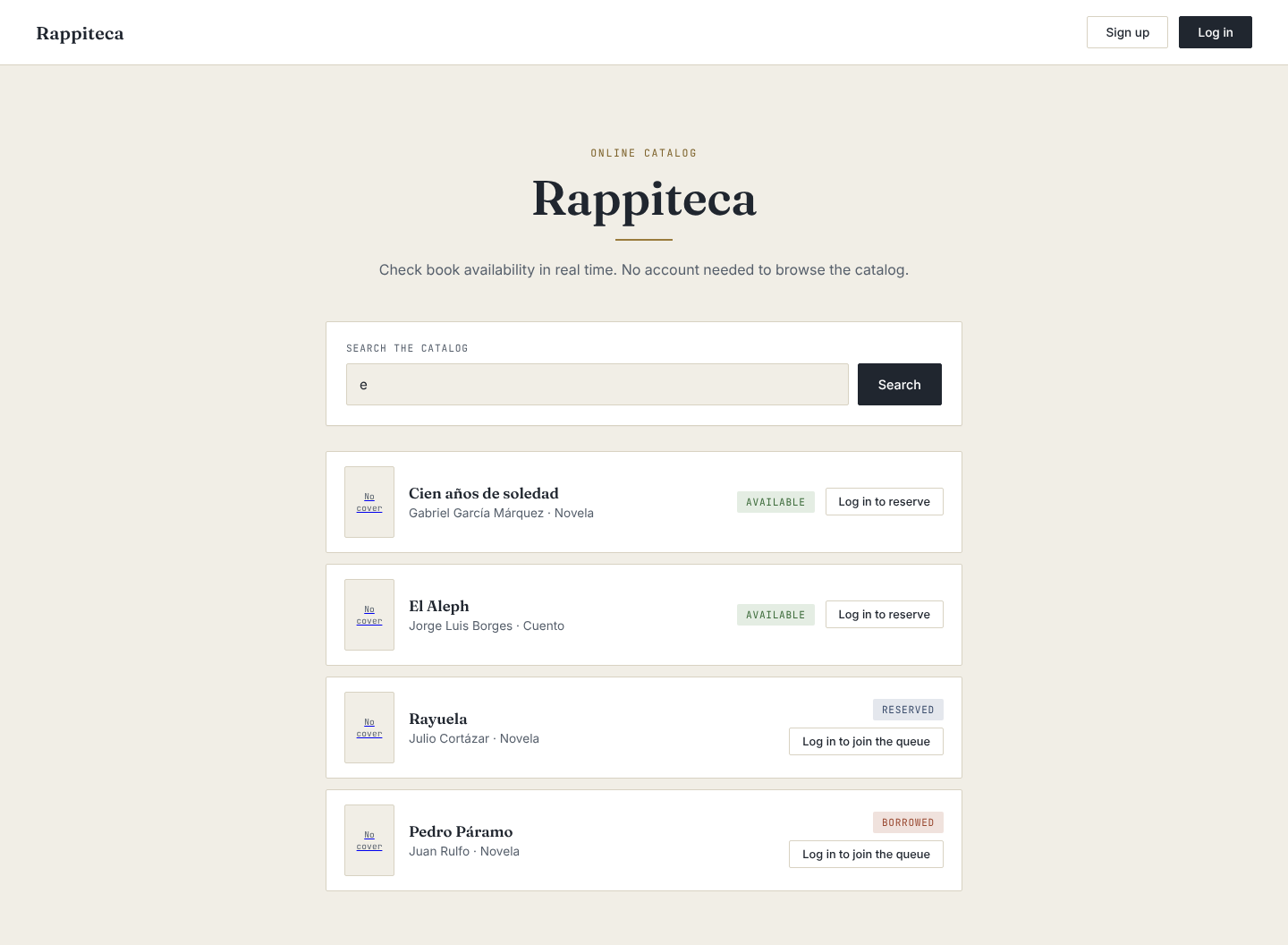
| FR-07 | IF a user enters a search term (title, author, category, or ID) THEN THE Rappiteca system SHALL display matching book results within 3 seconds. | Must |
| FR-08 | IF a user selects an available book and requests a loan THEN THE Rappiteca system SHALL register the loan and update the book's availability status within 3 seconds. | Must |
| FR-09 | IF a user views the catalog or a book's details THEN THE Rappiteca system SHALL display the book's real-time availability status (available, borrowed, or reserved) within 3 seconds. | Must |
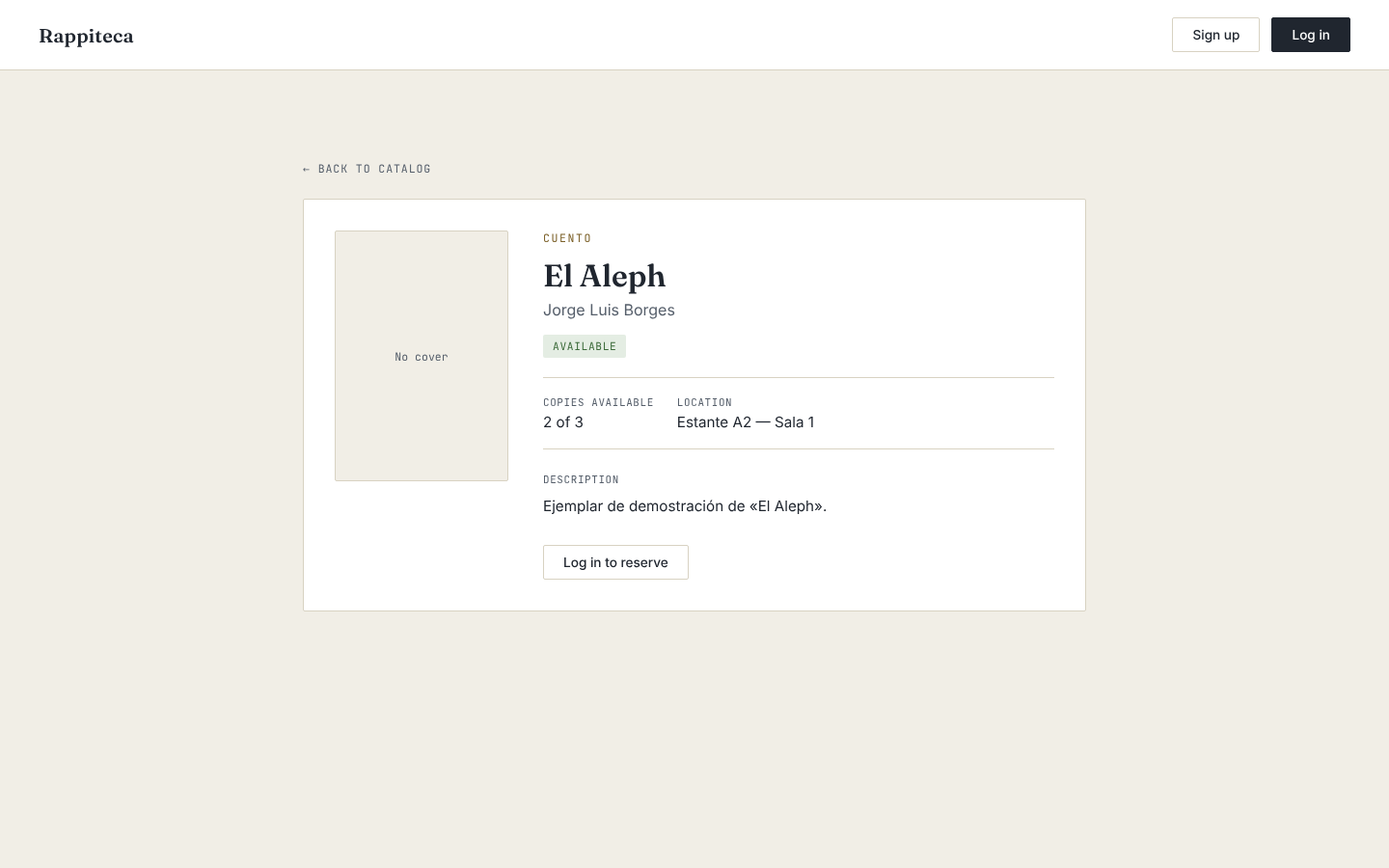
| FR-10 | IF a user selects a book from the catalog THEN THE Rappiteca system SHALL display the book's details (description, location, and copies available) within 3 seconds. | Must |
| FR-11 | IF a user selects an active loan and confirms the return THEN THE Rappiteca system SHALL register the return and update the book's availability status within 3 seconds. | Must |
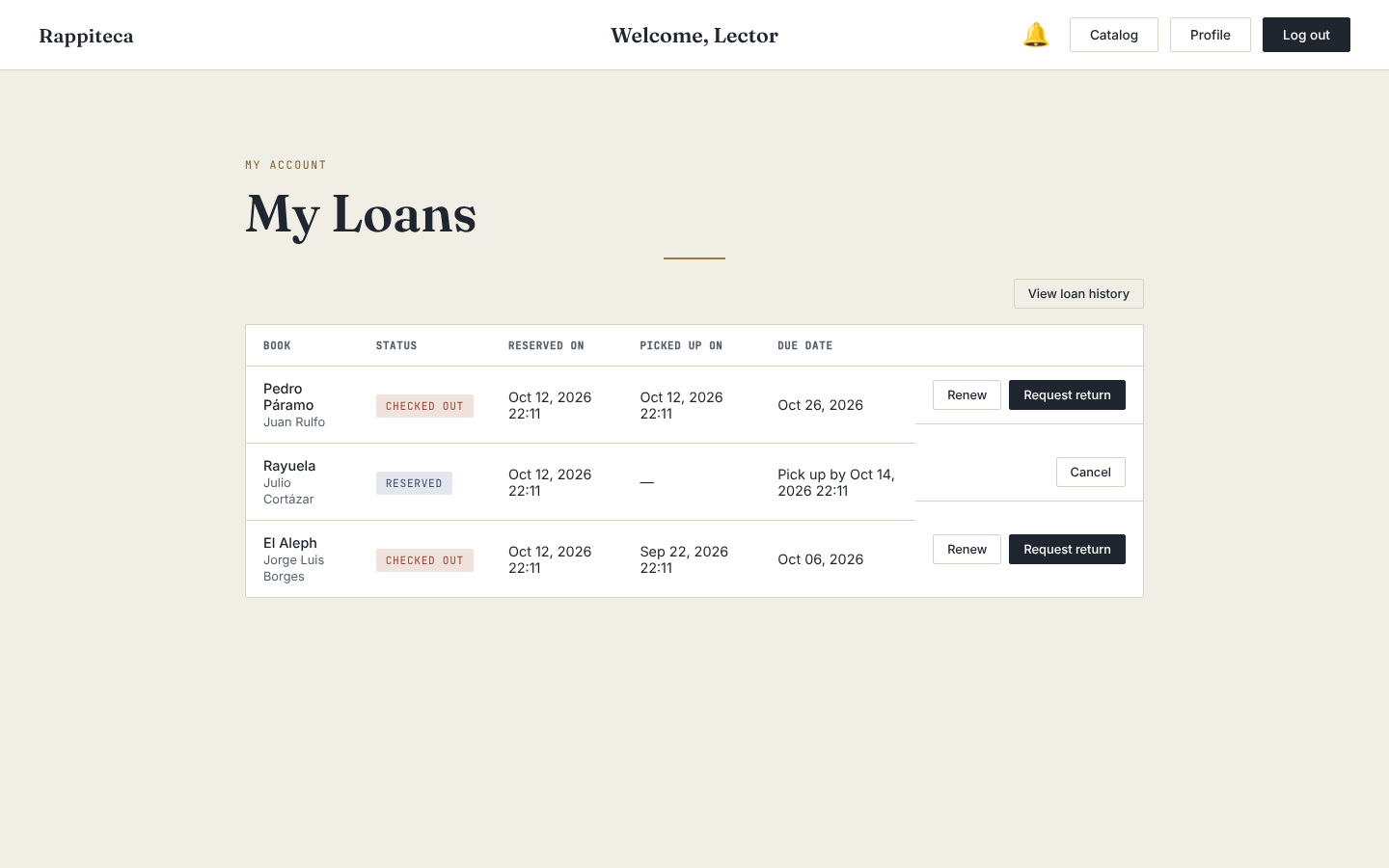
| FR-12 | IF a user selects an active loan and requests a renewal THEN THE Rappiteca system SHALL extend the loan's due date within 3 seconds. | Must |
| FR-13 | IF a user accesses their loan section THEN THE Rappiteca system SHALL display the list of active loans along with their due dates within 3 seconds. | Must |
| FR-14 | IF a loan's due date is approaching THEN THE Rappiteca system SHALL send the user a reminder notification via email and/or in-app notification. | Must |
| FR-15 | IF a user selects the logout option THEN THE Rappiteca system SHALL end the user's session within 3 seconds. | Must |
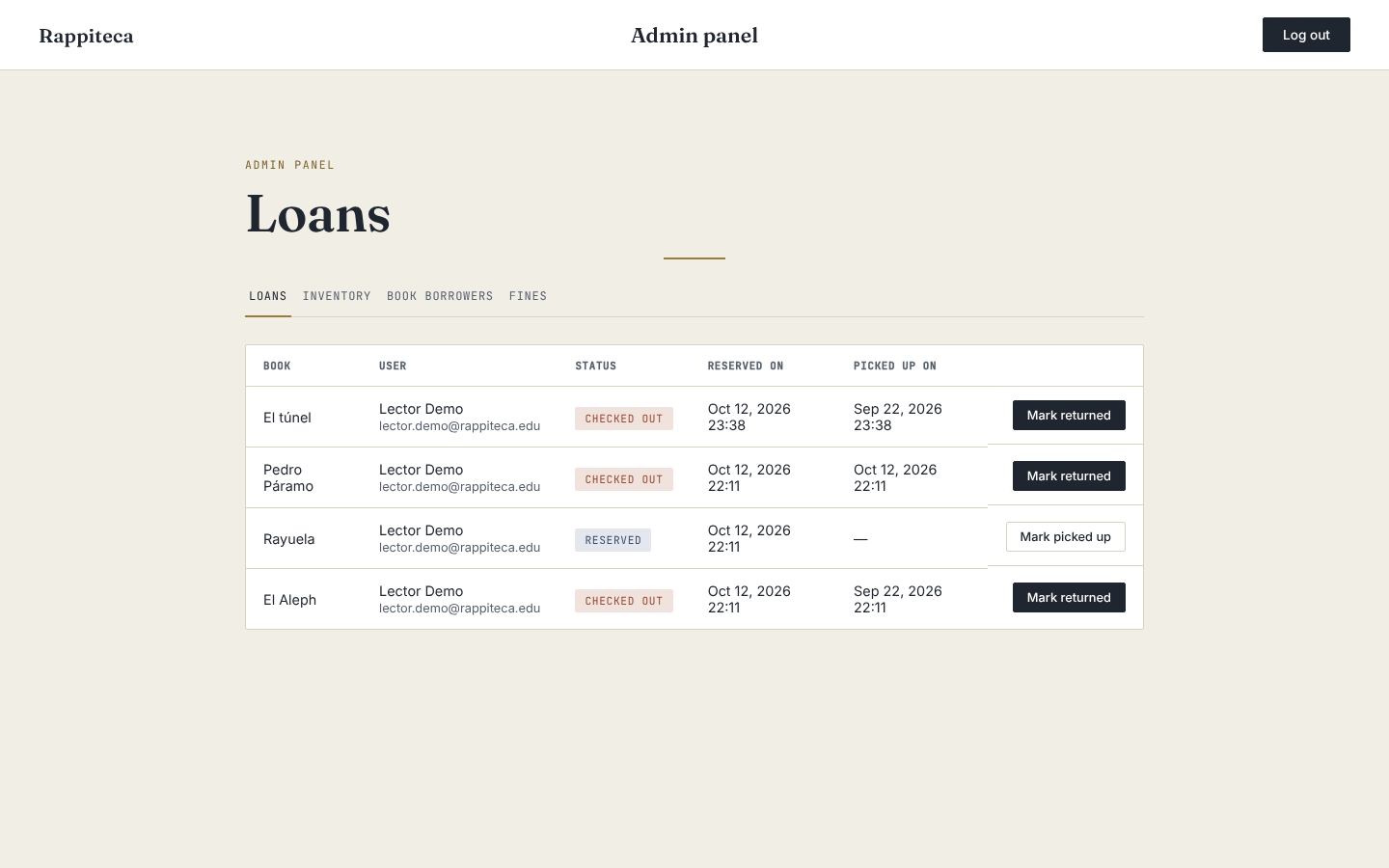
| FR-16 | IF an administrator selects a book THEN THE Rappiteca system SHALL display the current borrower's information within 3 seconds. | Must |
| FR-17 | IF a user selects a book with no available copies THEN THE Rappiteca system SHOULD allow the user to place a reservation within 3 seconds. | Should |
| FR-18 | IF a user selects an active reservation and confirms cancellation THEN THE Rappiteca system SHOULD remove the reservation within 3 seconds. | Should |
| FR-19 | IF a loan's due date has passed THEN THE Rappiteca system SHOULD send the user an overdue alert via email and/or in-app notification. | Should |
| FR-20 | IF a reserved book becomes available THEN THE Rappiteca system SHOULD notify the user within 3 seconds of the status change. | Should |
| FR-21 | IF a user accesses their profile section THEN THE Rappiteca system SHOULD display the user's personal information within 3 seconds. | Should |
| FR-22 | IF a user accesses their loan history section THEN THE Rappiteca system SHOULD display the user's complete loan history within 3 seconds. | Should |
| FR-23 | IF a loan becomes overdue THEN THE Rappiteca system SHOULD automatically calculate the corresponding fine based on the number of overdue days. | Should |
| FR-24 | IF a fine has been calculated for a user THEN THE Rappiteca system SHOULD apply the fine to the user's account within 3 seconds. | Should |
| FR-25 | IF a user or administrator accesses the fines section THEN THE Rappiteca system SHOULD display the payment status of each fine within 3 seconds. | Should |
| FR-26 | IF a fine is applied to a user's account THEN THE Rappiteca system SHOULD notify the user via email and/or in-app notification. | Should |
| FR-27 | IF a user performs a catalog search THEN THE Rappiteca system SHOULD allow the user to filter and sort the results within 3 seconds. | Should |
| FR-28 | IF an administrator selects a registered user THEN THE Rappiteca system SHOULD display the user's profile information within 3 seconds. | Should |
| FR-29 | IF an administrator modifies a user's profile information THEN THE Rappiteca system SHOULD update the user's record within 3 seconds. | Should |
| FR-30 | IF a user requests a password reset THEN THE Rappiteca system SHOULD send a password recovery link to the user's registered email within 3 seconds. | Should |
| FR-31 | IF an administrator requests the most-borrowed-books report THEN THE Rappiteca system SHOULD generate and display the report within 5 seconds. | Should |
| FR-32 | IF an administrator requests the overdue rates report THEN THE Rappiteca system SHOULD generate and display the report within 5 seconds. | Should |
| FR-33 | IF an administrator requests the most-active-users report THEN THE Rappiteca system CAN generate and display the report within 5 seconds. | Could |
| FR-34 | IF a user views a book's details THEN THE Rappiteca system CAN display the book's cover image, when available, within 3 seconds. | Could |
| FR-35 | IF an administrator performs an action on the system (e.g., inventory change, fine management) THEN THE Rappiteca system CAN record the action in the audit log within 3 seconds. | Could |
| FR-36 | IF multiple users reserve the same unavailable book THEN THE Rappiteca system CAN manage a waitlist and notify users in order of reservation. | Could |
| FR-37 | IF an administrator uploads a CSV/Excel file with book records THEN THE Rappiteca system WONT import and add the valid records to the catalog within 30 seconds. | Won't |
| ID | Requirement |
|---|---|
| US-01 | THE web application SHALL maintain a consistent visual structure across all pages, using the same style and color palette. |
| US-02 | THE web application SHALL load within 3 seconds on a stable internet connection. |
| US-03 | THE web application SHALL display feedback confirming that an action (e.g., loan request, return, reservation) completed successfully. |
| US-04 | THE web application SHALL display a clear and specific error message when an action cannot be completed. |
| US-05 | THE web application SHALL complete a book loan or return request within 3 seconds under normal load conditions. |
| US-06 | THE web application SHALL allow a first-time user to complete a book search without external assistance or a help guide. |
| US-07 | THE web application SHALL allow a returning user to complete a loan renewal in no more than 3 steps (clicks/taps) from the active loans view. |
| US-08 | THE web application SHALL achieve a minimum average user satisfaction score of 4 out of 5 in post-release usability surveys. |
Stack: Django (Python) with MongoDB. The following requirements are derived from the entities implied by the Functional Requirements in Section 2.1 (User, Book, Loan, Reservation, Fine, AuditLog)
| ID | Requirement |
|---|---|
| LDR-01 | A User document shall store name, institutional email, password hash, and role (user or admin). |
| LDR-02 | A Book document shall store title, author, category, ISBN, description, location, total copies, and available copies. |
| LDR-03 | A Loan document shall reference exactly one User (via user_id) and one Book (via book_id). |
| LDR-04 |
Book.isbn shall be unique and indexed. |
| LDR-05 | A user may hold at most one active Loan per book (unique constraint on the combination of user_id, book_id, and status = active). |
| LDR-06 |
Book.copies_available shall be indexed, since availability status is queried on every search and every book detail view. |
| LDR-07 | Only administrators shall have write access to the Book collection; regular users shall have read-only access. |
| LDR-08 | Only the owning user or an administrator shall have read access to a given user's Loan and Fine documents. |
| LDR-09 |
Loan documents shall be retained indefinitely to preserve loan history, as required by FR-24. |
| LDR-10 |
AuditLog documents shall be retained for a minimum of 90 days, consistent with FR-36. |
Duration: ~6 minutes
Hi, we're the team behind Rappiteca, a project developed for Proyecto Integrador 1 at Universidad EAFIT.
Let's start with the problem. Educational institutions — students, faculty, and library staff — still rely on slow, error-prone, manual processes to manage their libraries. Checking if a book is available often means walking to the library in person. Requesting a loan, renewing it, or finding out when a reserved book becomes available usually involves paper forms or waiting in line. And on the administration side, staff have to track inventory, due dates, and fines manually, which leads to delays and human error.
We saw an opportunity here: what if students and library staff could manage the entire loan process — from checking availability to returning a book — in real time, from any device?
Let me introduce the team behind Rappiteca.
I'm Emanuell Torres López — I've worked on organizing our requirements and setting up our project documentation. Cristobal Rodríguez, who you just heard from, has led the definition of the project's backlog and repository structure. Juan Camilo Ríos Rodríguez has worked on defining our functional requirements and coordinating the team's workload. And Carlos Ochoa has supported the task of requirements prioritization and development of code.
Together, we're a team of four Systems Engineering students building a real solution to a problem we've all experienced as students ourselves.
So, what exactly is Rappiteca?
Rappiteca is a web application that lets library users check book availability in real time, request loans, renew them, and reserve titles that are currently unavailable — all without depending on in-person, paper-based procedures. Users also get automatic notifications for due dates and when a reserved book becomes available.
For administrators, Rappiteca centralizes inventory control, loan and return tracking, and automatically generates reports on overdue items and catalog usage.
Our value proposition is simple: we eliminate manual and paper-based processes to reduce operating costs, we increase user satisfaction through a self-service, agile experience, and we remove the friction that currently limits how many loans and reservations a library can actually process — all while building a solution that's scalable enough to be implemented across multiple institutions.
To make this vision real, we defined and prioritized our functional requirements using the MoSCoW method. Here are our top 10 "Must-have" requirements for Rappiteca:
- User registration
- User login
- Search books by title, author, category, or ID
- Real-time availability status — available, borrowed, or reserved
- Book detail view, including description, location, and copies available
- Requesting a loan directly through the platform
- Viewing active loans and their due dates
- Renewing a current loan
- Self-service book returns
- Admin visibility into who currently has each book checked out
These ten requirements form the core loop of Rappiteca: search, borrow, track, and return — with full visibility for both users and staff.
Thanks for watching — this is Rappiteca.
Delivery 2

- accounts — Manages user and administrator registration, login, and profiles.
- catalog — Manages the book inventory: adding, editing, deleting, and searching titles.
- loans — Manages the loan lifecycle: requesting, returning, renewing, and tracking loans.
- reservations — Manages reservations for unavailable books and their waitlist.
- fines — Calculates and manages fines for overdue loans.
- reports — Generates administrative reports and system usage statistics.


Delivery 3

- accounts — Manages user and administrator registration, login, and profiles.
- catalog — Manages the book inventory: adding, editing, deleting, and searching titles.
- loans — Manages the loan lifecycle: requesting, returning, renewing, and tracking loans.
- reservations — Manages reservations for unavailable books and their waitlist.
- fines — Calculates and manages fines for overdue loans.
- reports — Generates administrative reports and system usage statistics.


The logo combines an open book (the library) with speed lines on its left side, which express the idea behind the name Rappi + biblioteca: getting library services quickly and from anywhere. The brass ribbon works as a bookmark and ties the icon to the accent color of the application. The wordmark uses Fraunces, the same serif typeface used for titles in the app, with "teca" highlighted in brass.
Icon version (for favicon / small sizes):

"Your library, one click away."
It summarizes the value proposition of Rappiteca: checking availability, borrowing, renewing and reserving books without paper forms or waiting in line.

| Color | HEX | Use in the app |
|---|---|---|
| Ink | #20262F |
Main text, titles, primary buttons |
| Ink soft | #565F6B |
Secondary text and subtitles |
| Paper | #F1EEE6 |
Page background |
| Paper raised | #FFFFFF |
Cards, header and tables |
| Brass | #9A7B3C |
Accent: labels, dividers, highlights |
| Brass deep | #7C6129 |
Accent hover state |
| Line | #D8D2C2 |
Borders and separators |
| Available | #3C6B3A |
"Available" status badge |
| Borrowed | #9A4A32 |
"Borrowed" / "Checked out" status badge |
| Reserved | #3A4C6B |
"Reserved" status badge |
Typography: Fraunces (titles), Inter (body text), JetBrains Mono (labels and badges).
The palette is defined as CSS variables in catalog/static/catalog/css/style.css, which keeps a consistent visual structure across all pages (US-01).
Catalog search with real-time availability status
Book details
User loans section
Administrator loan management
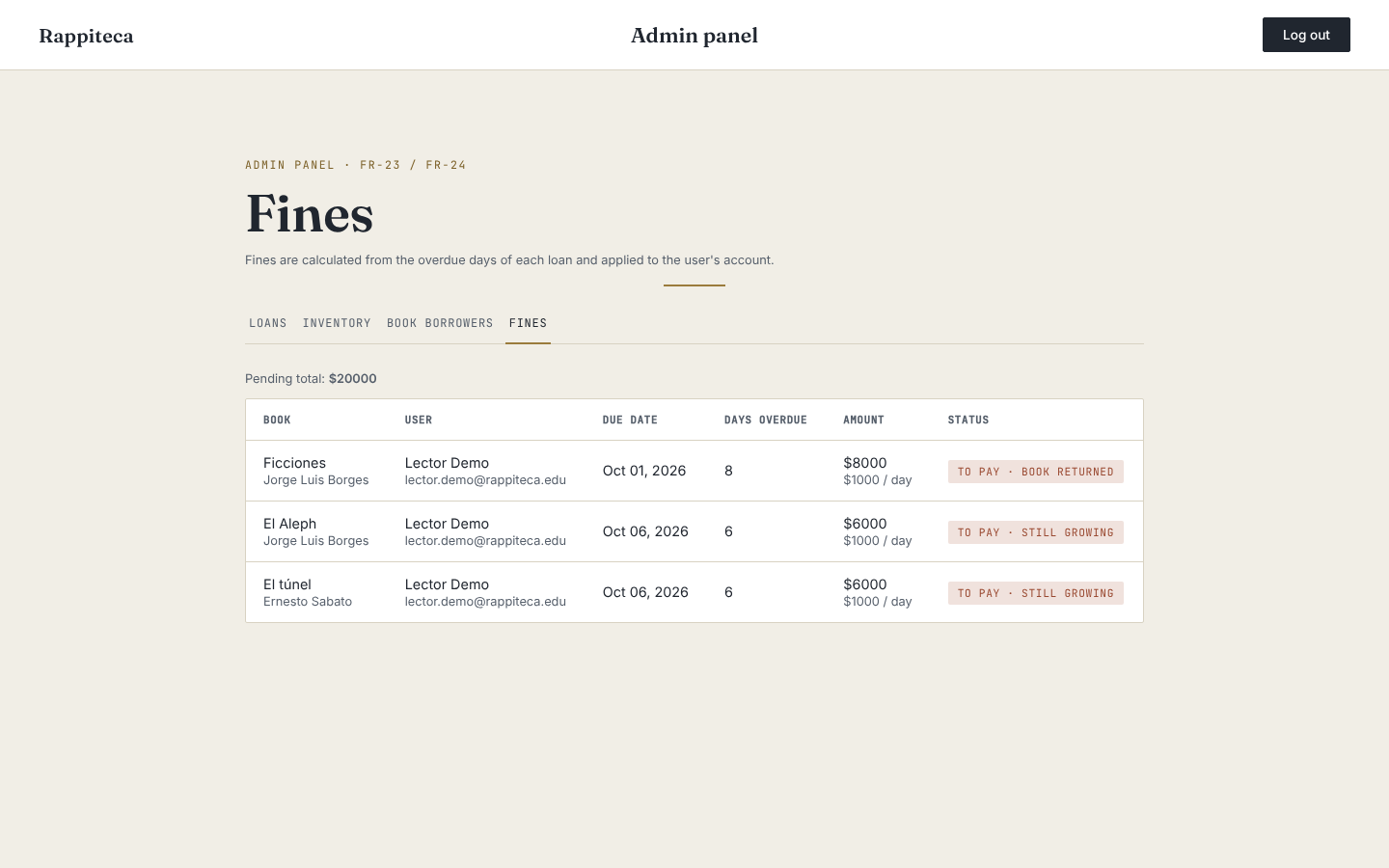
Fines tab in the admin panel: overdue books with the fine applied to each user's account (FR-23 / FR-24)
- We delivered the Sprint 3 requirements (FR-17 to FR-24): waitlist, reservation cancellation, overdue alerts, availability notifications, user profile, loan history, and fine calculation and application.
- Most requirements were developed in their own branch and merged through a pull request, which kept
mainstable and made each change easy to review. - Most new requirements were delivered with automated tests, so we could check that new features did not break existing ones.
- The visual style stayed consistent across pages thanks to the shared CSS variables.
- Communication and task assignment: in previous sprints we left coordination until the last minute, and the workload for this sprint was assigned late, which pushed most of the coding to the second half of the sprint.
- Code consistency: part of the code is still written in Spanish and part in English, and some helper functions are duplicated across apps.
- The documentation got out of sync with the code: the README and component diagram list
reservationsandreportsmodules that do not exist as separate apps yet. - Scheduled tasks (reminders, overdue alerts, fines) depend on management commands that have to be run manually; there is no scheduler configured.
- Assign requirements in the first days of the sprint and do a short mid-sprint check-in.
- Agree on English as the only language for code (names, comments and messages).
- Update the README and diagrams when a module is added or changed, in the same pull request.
- Document how to run the periodic commands (
check_overdue_loans,send_loan_reminders,expire_reservations,calculate_fines) and evaluate a scheduler. - Implement the remaining fine requirements (FR-25 payment status and FR-26 fine notifications) on top of the new
finesapp.
- Presented by — Juan Camilo Rios Rodriguez.
- Sprint 3 focused on making the reservation process more flexible and fair, and on keeping users informed. Users can now cancel a reservation they no longer want, join a waiting queue when a book has no copies, receive alerts about their loans and reservations, check their profile and loan history, and the system calculates and applies fines for overdue loans.
- Value for the final product — fewer blocked copies, a fair first-come first-served process for popular books, and less manual work for the librarian.
- Result — 8 of 8 planned requirements completed (FR-17 to FR-24).
- FR-17 Reserve unavailable book and FR-18 Cancel reservation — Juan Camilo Rios Rodriguez. A user cancels a reservation before the admin checks the book out. With a book at 0 copies, users join the waiting queue and see their position. When a copy is freed, the first user in the queue receives the reservation automatically.
- FR-19 Overdue loan alert and FR-20 Reservation availability notification — Emanuell Torres Lopez. The user is notified when a loan is overdue and when a reserved book is ready for pickup.
- FR-21 User profile display and FR-22 User loan history — Cristobal Rodriguez Rojas. The user views their profile information and the list of their past loans.
- FR-23 Automatic fine calculation and FR-24 Apply fine to account — Carlos Manuel Ochoa Cifuentes. An overdue loan generates a fine that is calculated automatically and applied to the user's account.