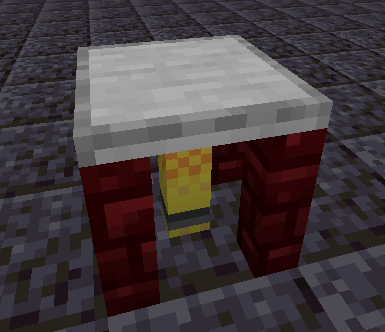
The Soldering Table can be used to solder materials directly to each other, allowing for more efficient crafting of certain blocks than the crafting table; however, exotic materials are required to create it.

Activating the Soldering Table brings up the Soldering screen:

The scrollable panel at the left displays all soldering recipes available on the server. Clicking a recipe button will display the recipe's output item in the right slot if the player has enough ingredients in their inventory. Clicking the output item will craft the item, picking it up and consuming the ingredients listed on the left. Shift-clicking the output slot will craft as many items as the player has the resources to create.
| Block |
Block/Item ID |
Localization Key |
| Soldering Table |
morered:soldering_table |
block.morered.soldering_table |
| Block Properties |
Value |
| Map Color |
Stone |
| Blocks Movement |
Yes |
| Flammable |
No |
| Liquid |
No |
| Opaque |
No |
| Replaceable |
No |
| Solid |
No |
| Blast Resistance |
3.5 |
| Hardness |
3.5 |
| Light Output |
0 |
| Tool Required |
Pickaxe |
| Flammable |
No |
| Piston Reaction |
Pushable |
| Render Type |
Solid |
| Item Properties |
Value |
| Stack Limit |
64 |
| Blockstate Properties |
| None |
| Version |
Changelog |
| 1.20.1-4.0.0.0 |
The gatecrafting_plinth block has been renamed to soldering_table. The gatecrafting recipe type has been renamed to soldering. Soldering recipe files have been renamed accordingly. |
| 1.16.3-2.0.0.0 |
More Red recipes now use tag ingredients instead of specific items in more places |
| 1.0.0.0 |
Added to game as gatecrafting_plinth
|