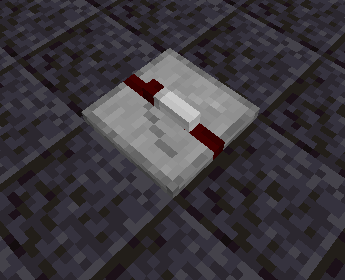
The Pulse Gate is a block that outputs maximum-strength redstone power from its output face for two ticks when its input face starts receiving power, then stops emitting power until you turn it off and on again.

The Pulse Gate can be placed in 24 different orientations, on floors, walls, and ceilings.
When placing the block, the flat side will be placed against the face clicked by the player, and the output side will point to the edge of the clicked face nearest to where the player clicked. A transparent preview is rendered to assist with orienting the block; this can be disabled in the Client Config if this is undesired.

While the input side of the pulse gate starts receiving power, the pulse gate enters the powered=true state for two ticks. After two ticks, it enters the powered=false state. The pulse gate will remain unpowered until the input side stops receiving power and then starts receiving power again.


| Block |
Block/Item ID |
Localization Key |
| Pulse Gate |
morered:pulse_gate |
block.morered.pulse_gate |
| Block Properties |
Value |
| Map Color |
Stone |
| Blocks Movement |
Yes |
| Flammable |
No |
| Liquid |
No |
| Opaque |
No |
| Replaceable |
No |
| Solid |
No |
| Blast Resistance |
0 |
| Hardness |
0 |
| Light Output |
0 |
| Tool Required |
No |
| Flammable |
No |
| Piston Reaction |
Pushable |
| Render Type |
Cutout |
| Item Properties |
Value |
| Stack Limit |
64 |
| Blockstate Properties |
Values |
facing |
{"down", "up", "north", "south", "west", "east"} |
rotation |
[0,3] |
input_b |
{false, true} |
powered |
{false, true} |
| Version |
Changelog |
| 1.20.1-4.0.0.0 |
Added to game |
| 1.16.3-2.0.0.0 |
More Red recipes now use tag ingredients instead of specific items in more places |
| 1.0.0.0 |
Added to game |