Emby HDR to SDR Thumbnail & Chapter Image Generator using Tonemapping - Cheesegeezer/MediaInfoWiki GitHub Wiki
1 - Background
The Thumbnail and Chapter images created by emby when using HDR sources and displayed on a SDR screen or a HDR screen before playback begins (*) - look generally colourless and very 'off'.
This extension to the MediaInfo Plugin gives you the option of replacing all the necessary Thumbnails & Chapter points with tonemapped images created from the original HDR source - thus more accurately representing the SDR equivalent image.
(*) HDR TV's will generally only activate their HDR 'Mode' when playback begins - thus the menu's and chapters will be in 'SDR' mode.
Emby have also chosen to change various contrast, gamma and saturation elements in the original images to try and improve it vs raw SDR - but this is no substitute for correctly tonemapping it as you an see from the examples below.
2 - Plugin Options Overview

3 - Examples
Applies to both Chapters and Preview Thumbnails (10 second)

As you can see above, these chapter points are colourless and dull because they are created from the HDR Source without proper tonemapping.

The above images have been passed though the Plugin and are now using HDR > SDR tonemapping. They are much more vibrant and pleasing to look at.
 No tonemapping ..
 With Tonemapping ..
4 - Requirements / Prerequisites
4.1 - Emby FFMpeg
The emby version of ffmpeg must be used as this plugin uses a variant of the quick-image-series process which uses a much faster way of grabbing images every 10 seconds to create the thumbnails. There is no special setup here - the setting/location of ffmpeg is taken from the emby system.
4.2 - BIFTool
This plugin makes use of the Roku supplied BIFTool - downloaded from here - Roku BIF Tool
It has only been tested on Windows, but the tool appears to be available for - Mac, Linux & Windows
Once downloaded/installed - simply point to biftool.exe in the option below -

4.3 - BIF Output
Currently the plugin only saves the tonemapped BIF files when they are stored with the source files. This option is turned on in the Library settings by toggling the Advanced bar -
This will need to be carried out on each library that contains Movies or Episodes
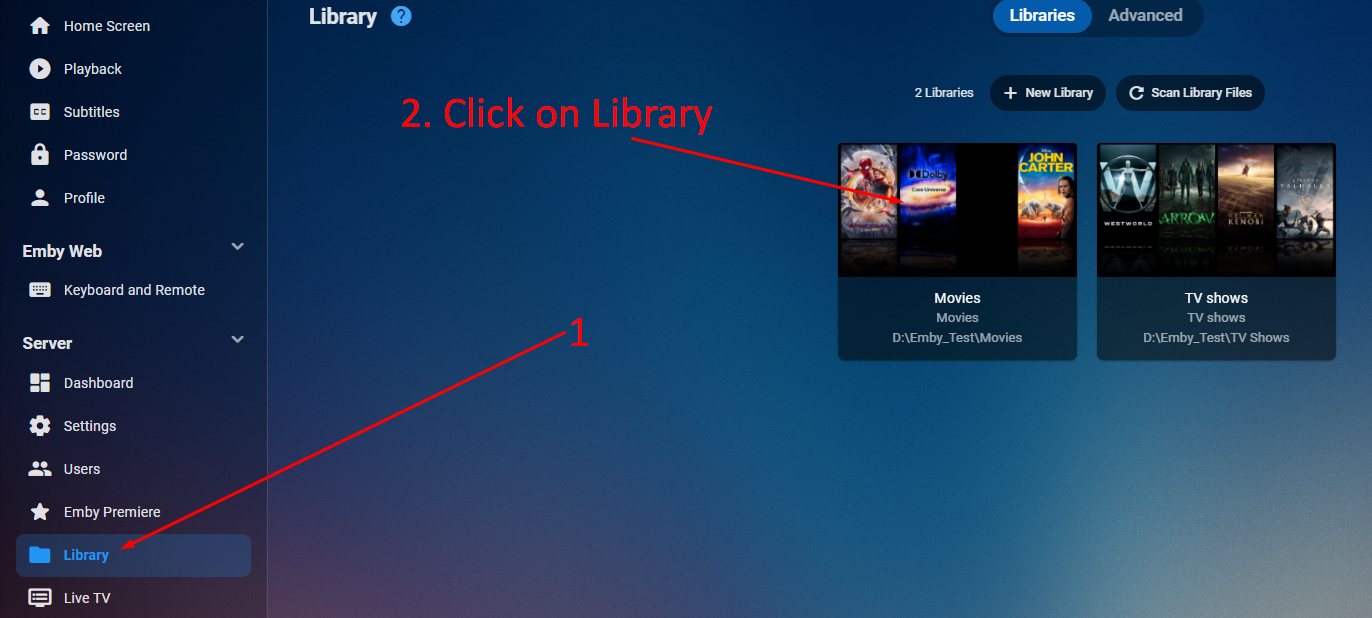
Turn on Advance options
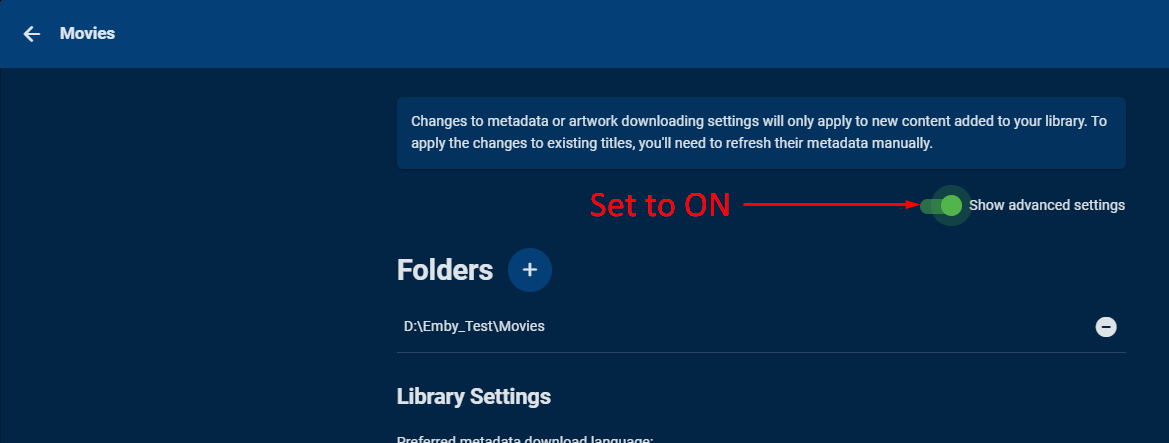
and then ticking the option to store with the source media -
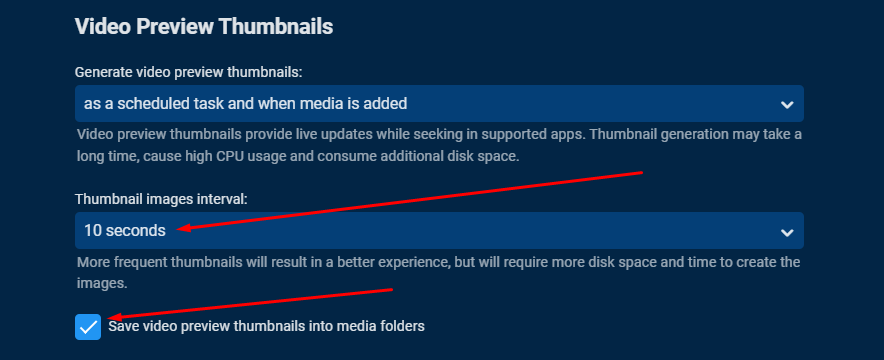
As an example - if my source file was in c:\media\mymovie.mkv - then the associated bif file would now be created in c:\media\mymovie.bif
If you already have this option set - then the new bif files will overwrite the existing ones.
5 - Usage
5.1 - Library Selection
You can select to do this on Movies/Films and/or TV Series - but the Item must be HDR - see below -

5.2 - Running / Scheduling
This feature has it's own task which can be run directly from the Emby Scheduler or scheduled to run after X hours etc -

If the task is cancelled, it will finish the current Item and then cancel the rest. It will resume where it left off if there are more HDR Items to process.
6 - Compatibility
Any emby Item that is classed as HDR will have it's BIF file tonemapped using the Mobius algorithm. This was chosen as it creates the brightest and most vivid of images - well suited to Chapter and Thumbnail duties.
The following HDR types are supported -
- HDR10
- HDR10+
- HLG
- Dolby Vision - Profiles 7 & 8
The following HDR types are not supported -
- Dolby Vision - Profiles 5
This is simply because Dolby Vision profile 5 has no HDR backwards compatible colour data and thus has no HDR colour primary value - thus it is ignored - retaining the original Emby thumbail images with the purple and green tinge.

7 - Performance
7.1 - Temp JPG files
The standard BIF creation process can be very intensive as it creates 100's maybe 1000's of small JPG files to then compile into a BIF file for Emby to use. We are now adding tonemapping into the equation - meaning that the entire process can use a lot of resources on lower powered systems.
The temp jpg files are written to /programdata/plugins/configurations/BIFTempImages
To increase performance, we suggest this is a SSD/NVME fast I/O capable location.
7.2 - CPU Performance
The ffmpeg process used is already part multithreaded where it is applicable to do so. Increasing to more than one ffmpeg 'process' is not an option at this time as the process is already intensive on lower power systems and we do not wish to cause performance issues with the daily running of the system.
7.3 - Running this process kills my disk/cpu performance ..
All we can suggest is using the scheduler to run out of normal usage hours - or stick with the non-tonemapped images.
8 - Logging
Extensive Info and Debug logging is available using the Media Info-HDRConvert log class.
Example log here
9 - Known Issues
9.1 - DTS:X IMAX
It has been brought to out attention that MediaInfo is not correctly identifying DTS:X for IMAX enhanced movies and sees them as regular DTS-HD MA 7.1 This is an outstanding issue with MediaInfo CLI itself - issue #422
See here for full details in the Emby Forums