5. IMU Class Hardware Configuration - CenterStage-23-24/CenterStage GitHub Wiki
To get the robot's angle we must use a tool called IMU (Inertial Measurement unit). IMU is a device that provides the orientation of an object. An IMU is included inside all control hubs in FTC. To get the robot’s orientation the robot coordinate system is used. The robot coordinate system has 3 axes: The X-axis which points out the right side of the robot, the Y-axis which points out the front of the robot, and the Z-axis which points up to the sky. The Heading or Yaw is the measure of the rotation about the Z-axis, the Pitch is the rotation about the X-axis, and the Roll is the rotation about the Y-axis. For the field-centric drive, we will be using the heading/yaw.
Now we will configure the IMU. Like all configurations, we will use hardwareMap.get(). However, to configure an IMU we must also provide the placement of the control hub in the code. In most cases, we provide the direction that the control hub logo is facing and the direction that the USB ports are facing. In order for this code to work, the control hub must be placed in an orthogonal manner. In other words, if you imagine a cube anywhere on the robot with one side that is parallel to the floor and one side that is parallel to the front face of the robot, the control hub should be placed on one of the faces of this cube. If your control hub is not placed in this manner there are ways to make the code work, but I recommend that you place the control hub in an orthogonal manner. For more information please click here.
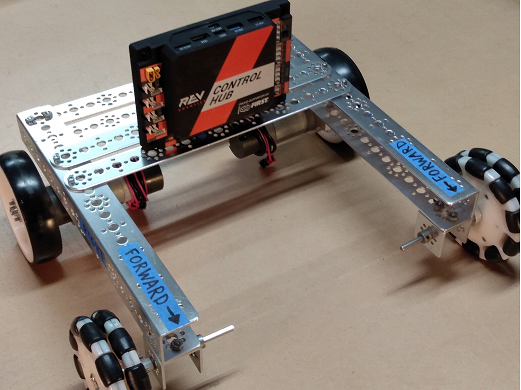
In this tutorial, I will be using a robot (shown to the right) which has its logo facing forward and USB facing up. Below is the code.
Now we will create a variable to store the heading of the robot. To do this we will get the yaw using the IMU. If you recall from before heading and yaw are both the angle of rotation about the Z-axis. We will store the heading in radians instead of degrees as this will help us in our calculations later on.