How to add a Nickname - CK3RealmsinExile/RealmsInExile GitHub Wiki
Its a three step process, but the steps can be done in any order, though its probably best to do the loc last. Its probably worth doing a quick search in our nick file and the vanilla one to see if a nickname you want to add already exists!
The Nicknames File
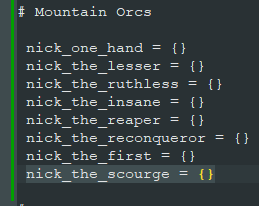
Open \LotRRealmsInExileDev\common\nicknames\lotr_nicknames.txt
Here you can add your nickname in the appropriate spot. Nicknames always start with nick_
As an example we will be adding nick_the_scourge = {}
The nicknames Localization File
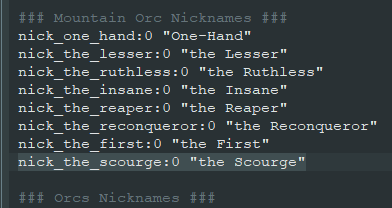
Open the localization file \localization\english\lotr_nicknames_l_english.yml
Here, you can add the localization for your nickname in the appropriate spot. Note that unlike vanilla, Realms nicknames that start with a "the" are always written in lowercase!
in this case we will be adding `nick_the_scourge:0 "the Scourge"
Adding the Nickname to the character history
Navigate to the appropriate character in the character history file you wish to add a nickname to.
The character history files are in \LotRRealmsInExileDev\history\characters
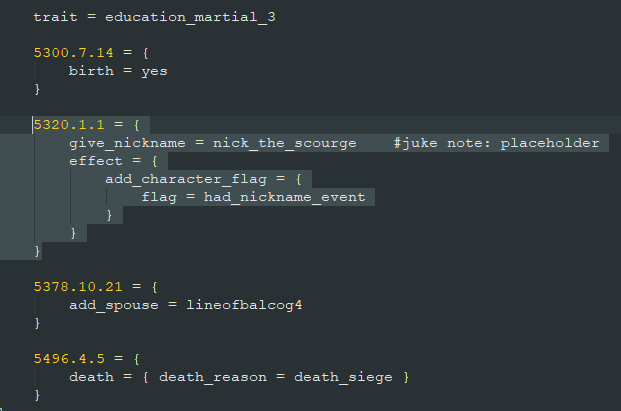
You can add a date during which you want the nickname to be added to the character history, though its also possible to just assign it at birth for convenience. (Rule of thumb: If the character is alive during a start date, you probably dont want a one year old called "the Scourge" running around)
You could simply use:
give_nickname = nick_the_scourge
but we use the function:
give_nickname = nick_the_scourge effect = { add_character_flag = { flag = had_nickname_event } }
We use the flag had_nickname_event to check if a character already has a nickname and shouldnt get a new one. Its easiest to just search for any use of "nick" in the file and copy the effect over to wherever you want to use it.
That should do it! If you want to add a nickname via event, you can use the exact same function in your event. If you got any questions feel free to shoot me a question on discord Juke™#0062