Miscellaneous HCS Tips - BrendonWatsonLab/Digital-Homecage GitHub Wiki
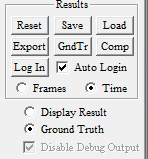
GndTr- This button loads a second .MBR file, typically a ground truth file that is to be used for comparison with the computer detected results. This need not be a ground truth file; it just assumes it to be. It could be a different on the same video file with different parameters.
Comp – This button allows the user to the current results file with the loaded gndTru file. The behavior records are compared side-by-side and matches, Type I and Type II errors are identified and cumulative results are presented in an Excel file. See Section 6.7 for more information.
The radio button pair below the 6 buttons described above is for choosing which of the two files (result file or ground truth file) is being displayed. The ground truth file needs to be loaded first before anything can be displayed. If it is has not been loaded, it will be an empty display.