Installing, Compiling, and Running MIT Haystack SRT Code - BenningtonCS/Telescope-2014 GitHub Wiki
These instructions were developed as a guide from a clean download of source files from the MIT Haystack Observatory website. If using the code pulled from the repository, some of the steps (modifying the srtnmake script for example) may not be necessary, but the guide should still hold, overall.
Note that these instructions were written for Ubuntu 12.10
$ lsb_release -a
No LSB modules are available.
Distributor ID:	Ubuntu
Description:	Ubuntu 12.10
Release:	12.10
Codename:	quantal
MIT Haystack Observatory SRT
The MIT Haystack Observatory SRT website includes the manuals, documentation, and program code. The code base we are looking at, SRT Source Code ver 3, can be found here.
Setting Up the Source Code
To get the source code, either go to the website, linked above, and download SRT Source Code ver 3, or download directly from the link above. Once downloaded, the gzipped tarball should be in your Downloads directory: ~/Downloads/newsrtsource_ver3.tar.gz.
Move and Unzip File in New Directory
To create a new directory, move the gzipped tarball into it, and then unzip it, follow the commands below:
~$ mkdir radio
~$ mv Downloads/newsrtsource_ver3.tar.gz radio
~$ cd radio
~/radio$ tar -xzvf newsrtsource_ver3.tar.gz
~/radio$ cd srtnver3
You are now in the directory housing the SRT codebase. To see what exists in the directory, simply use the command ls.
At this point if you try to compile the code, it will fail, as we saw in class.
Breaking down the above commands
lswill list all the files in the directory you are incdallows you to change directories (folder) eg.cd Downloadswill put you in the downloads directorymvmoves a file from one directory (folder) to anothermkdircreates a new directory (folder)tar -xzvfa command to un-gzip and un-tar a file (decompress)
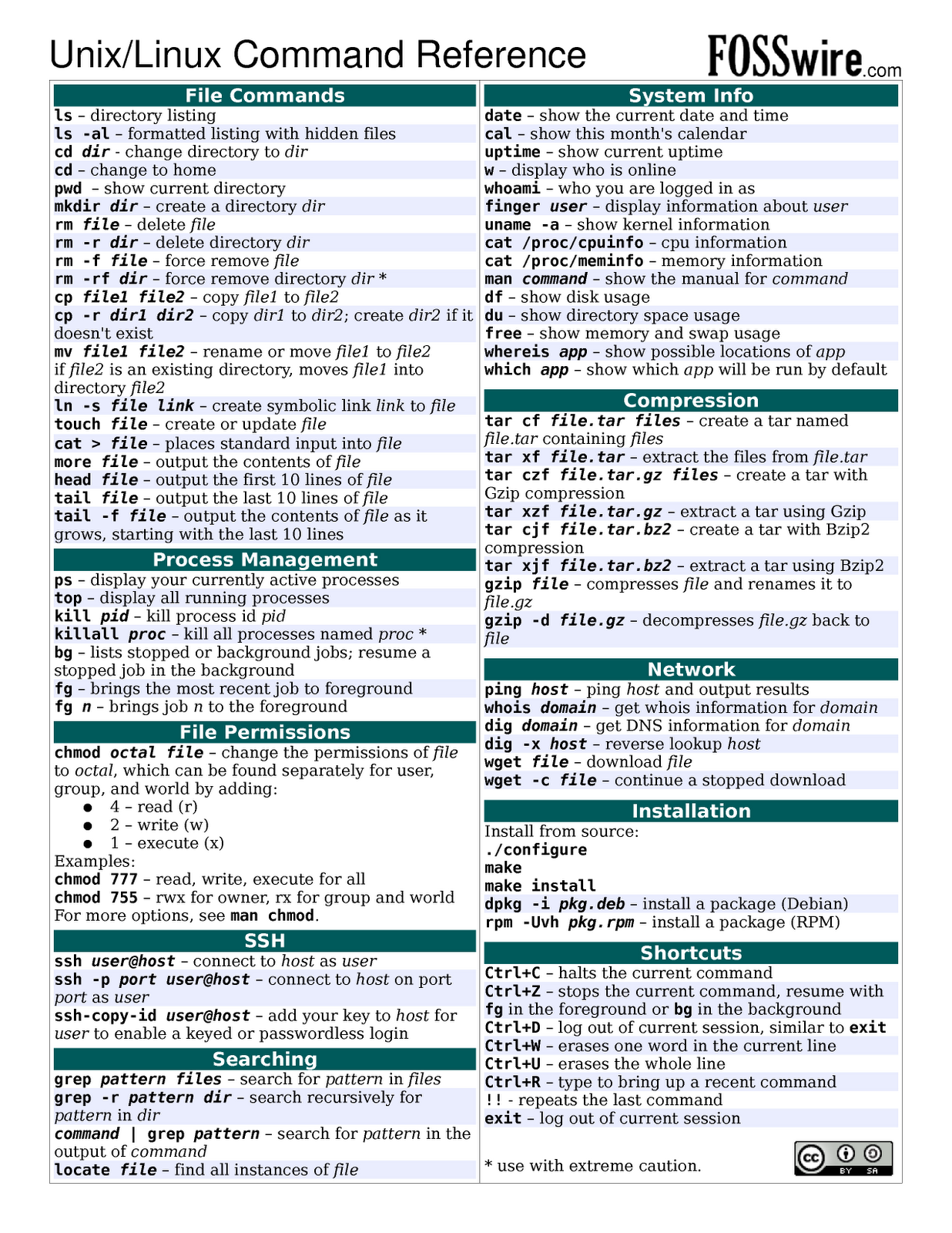
For more information on any command, in the terminal window, man [command] will display the manual for the given command. Additionally, here's a cheat sheet of commonly used UNIX commands.
Adding the Library Dependencies
The reason the code would not compile is because SRT uses libraries which the computer you are using does not have. To get them, use the command below:
~/radio/srtnver3$ sudo apt-get install libgtk2.0-dev libusb-1.0-0-dev
You will be prompted for your password, and may be prompted if you wish to continue after apt-get informs you of the package size to be installed. Input Y and press enter to continue downloading. These libraries should automatically be downloaded into the correct directory.
NOTE: If you are unable to download using apt-get install, try using the command apt-get update first, wait for all updates to be installed, and then retry the install command.
Breaking down the above commands:
sudo is used to give the user super user privilege which allows you to make dire changes to your computer if you so choose. Using the sudo command will require you to input your password, which it will ask for once the command is run.
apt-get is a software repository which is used on debian based distributions of linux (although Ubuntu is no longer debian based, it used to be and so still uses apt-get). Other software repositories include zypper (used by openSUSE), and pacman (used by arch). The software repos give you the ability to download software from the command line without having to search the internet to find the program you want to use.
The install part of the command is specific to apt-get. When using apt-get, you have to specify if you want to install a program, remove a program, or something else. Next, you specify the name(s) of the program(s) to be installed (or removed).
libusb-1.0-0-dev and libgtk2.0-dev are the names of the libraries we want to get for the SRT program.
Modifying the Compile Script
In order for the program to compile with gtk+-2.0, it must know that it has to use it/where to get it. (This was the problem that prevented it from compiling in class). To remedy this, simply
~/radio/srtnver3$ sudo nano srtnmake
to edit the bash script. Scroll to the bottom of the file to the gcc line, which should look like:
gcc -W -Wall -03 $CFLAGS $LIBS main.c vspectra_four.c disp.c plot.c cat.c geom.c time.c outfile.c sport.c map.c cmdfl.c cal.c srthelp.c velspec.c four.c librtlsdr.c tuner_r820t.c -lm `pkg-config --libs --cflags libusb-1.0`
and change it so the end section is now
... `pkg-config --libs --cflags gtk+-2.0 libusb-1.0`
Now you have all the libraries and the script should be able to compile successfully.
Compiling the Source Code
The script to compile the code (the one you just edited) should take care of all the compilation, so it is just a matter of running it
~/radio/srtnver3$ ./srtnmake
Once you execute this command, a few warnings should appear, with lines ending with [-Wunused-but-set-variable]. These errors are fine, and there should be relatively few of them as compared to before (running the compile script without the libraries or modification to the script). The output I got from running the compile script is shown below as a reference for which errors are acceptable.
~/radio/srtnver3$ ./srtnmake
main.c: In function ‘main’:
main.c:62:12: warning: variable ‘secstart’ set but not used [-Wunused-but-set-variable]
main.c:60:12: warning: variable ‘ii’ set but not used [-Wunused-but-set-variable]
main.c:59:14: warning: variable ‘color’ set but not used [-Wunused-but-set-variable]
main.c: In function ‘gauss’:
main.c:555:16: warning: variable ‘j’ set but not used [-Wunused-but-set-variable]
vspectra_four.c: In function ‘vspectra’:
vspectra_four.c:33:28: warning: variable ‘min’ set but not used [-Wunused-but-set-variable]
vspectra_four.c:33:12: warning: variable ‘avsig’ set but not used [-Wunused-but-set-variable]
vspectra_four.c:31:43: warning: variable ‘r’ set but not used [-Wunused-but-set-variable]
disp.c: In function ‘clearpaint’:
disp.c:440:18: warning: variable ‘update_rect’ set but not used [-Wunused-but-set-variable]
outfile.c: In function ‘outfile’:
outfile.c:16:16: warning: variable ‘n’ set but not used [-Wunused-but-set-variable]
sport.c: In function ‘rot2’:
sport.c:402:25: warning: variable ‘i’ set but not used [-Wunused-but-set-variable]
sport.c:402:17: warning: variable ‘status’ set but not used [-Wunused-but-set-variable]
sport.c:408:15: warning: ignoring return value of ‘system’, declared with attribute warn_unused_result [-Wunused-result]
cal.c: In function ‘cal’:
cal.c:18:24: warning: variable ‘ixe’ set but not used [-Wunused-but-set-variable]
srthelp.c: In function ‘display_help’:
srthelp.c:39:14: warning: variable ‘color’ set but not used [-Wunused-but-set-variable]
srthelp.c: In function ‘load_help’:
srthelp.c:254:10: warning: ignoring return value of ‘fgets’, declared with attribute warn_unused_result [-Wunused-result]
srthelp.c:258:14: warning: ignoring return value of ‘fgets’, declared with attribute warn_unused_result [-Wunused-result]
velspec.c: In function ‘velspec’:
velspec.c:19:14: warning: variable ‘color’ set but not used [-Wunused-but-set-variable]
velspec.c: In function ‘vplot’:
velspec.c:162:15: warning: variable ‘jmax’ set but not used [-Wunused-but-set-variable]
librtlsdr.c: In function ‘rtlsdr_open’:
librtlsdr.c:1267:13: warning: variable ‘rt’ set but not used [-Wunused-but-set-variable]
tuner_r820t.c: In function ‘R828_RfGainMode’:
tuner_r820t.c:2859:11: warning: variable ‘LnaGain’ set but not used [-Wunused-but-set-variable]
tuner_r820t.c:2858:11: warning: variable ‘MixerGain’ set but not used [-Wunused-but-set-variable]
~/radio/srtnver3$
Now the source code is successfully compiled!
Running the Program
If you look in the srtnver3 directory, you will notice an executable file called srtn. This is what we just compiled with srtnmake. To run:
~/radio/srtnver3$ ./srtn
Once executed, this should open a window which looks similar to the image below.
