Contributing Setting up the project - Autovw/AdditionalGunsDocs GitHub Wiki
Creating a GitHub account
Go to GitHub and register your account. If you already have one, log in instead.
Forking the GitHub repository
Go to the Additional Guns Github repository and make sure you are logged in to GitHub. Click on Fork to create a fork of the GitHub repository.

After you've created a fork you should have your own Additional Guns repository like this:

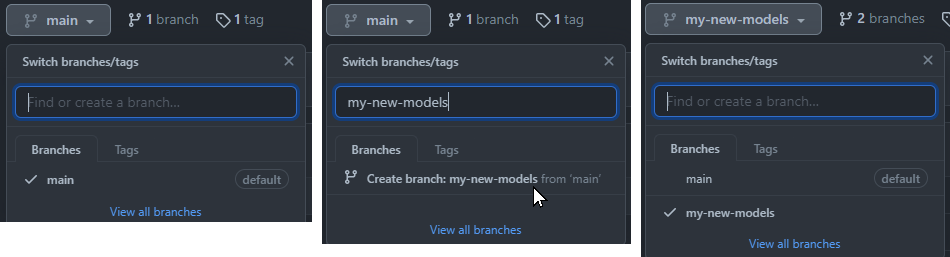
Creating a new branch on the forked GitHub Repository
You do not want to make any new commits to the main branch. Create a new branch from the main branch instead so you can keep the main branch up-to-date with the latest commits from Mr-Pineapple/AdditionalGuns.
And that should be it you did not install Git and GitHub Desktop! Reference: Introduction
GitHub Desktop: Cloning the repository locally
Once you've installed GitHub Desktop, and logged in with your GitHub account, go to File > Clone repository... > github-username/AdditionalGuns and click Clone.
GitHub Desktop: Switching branches
After you've cloned the repository make sure to switch to the new branch.