How to Install the TAF - Aperrett/TAF GitHub Wiki
2.0 SET-UP AND INSTALLATION
2.1 Overview
The Test Automation Framework can be worked upon within an Integrated Development Environment (IDE), such as Eclipse or IntelliJ IDEA, or using a text editor and it can be executed via command prompt (Windows)/Terminal (Mac or Linux).
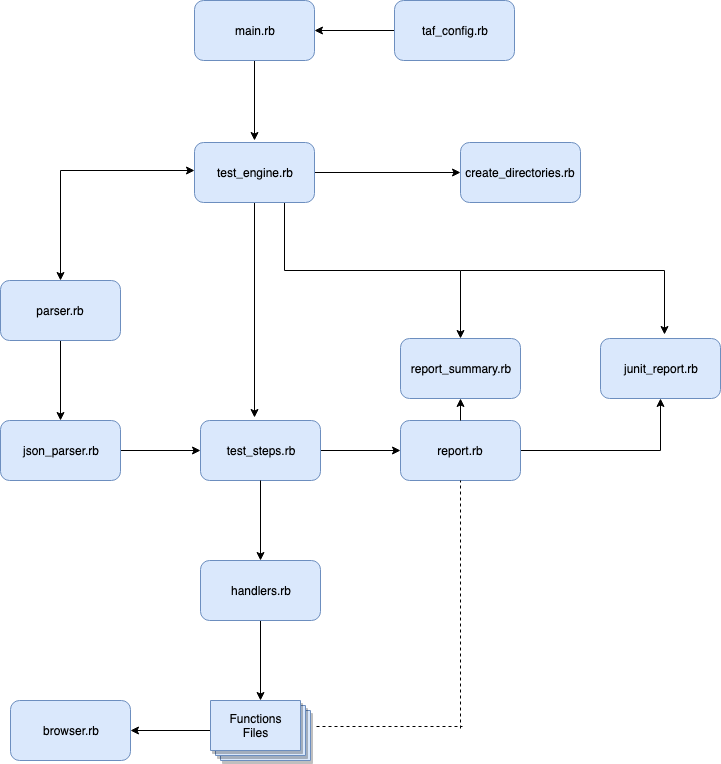 Figure 1: Test Automation Framework components
2.2 TAF Source Code
Checkout the TAF Source code from Github: https://github.com/Aperrett/TAF
To check out the source code open command line or terminal in that window, type: “git clone [email protected]:Aperrett/TAF.git”
Please note: We have 2 solutions to run the TAF in Native form or Dockerized.
2.3 Ruby Native Process
2.3.1 Ruby Install
If you would like to run the TAF in its native form then you will need to install Ruby and the required Ruby Gems.
Download Ruby for your relevant OS: https://www.ruby-lang.org/en/news/2018/03/28/ruby-2-5-1-released/ follow the Ruby install process for their application.
Install the Bundle Gem Open Command line or Terminal and type:
gem install bundle
Navigate to the checked out TAF source code folder, type:
cd QA-Tools/TAF/Code
Install the required Ruby Gems using bundle, type:
bundle install
2.3.2 Browser Drivers
Additional drivers are required to use the Test Automation Framework with different browsers:
Chrome Driver: https://sites.google.com/a/chromium.org/chromedriver/downloads follow their install process for their application.
Gecko Driver: https://github.com/mozilla/geckodriver/releases follow their install process for their application.
If on a Mac and you have Brew installed you can do the following command in terminal:
brew install geckodriver
2.4 Docker Process
2.4.1 Docker install
If you would like to run the TAF in Docker then you will need to install Docker.
Download Docker for your relevant OS: https://www.docker.com/get-docker. Follow the Docker install process for their application.
2.4.2 Build the TAF image in Docker
To build the TAF using Docker we use a Dockerfile which allows Docker to build our TAF image with all our required assets into a container, the Dockerfile is also stored in Bitbucket.
Please note: You will need your Test Specifications and Test Suite files before building the docker image.
Navigate to the checked out TAF source code folder:
cd QA-Tools/TAF/Code
To build the TAF image for Docker then type:
docker build -t taf .
2.5 Create Project Structure
The project structure can simply be created within Windows / Mac in the user’s workspace. This will allow the framework to be run from the command line.