iOS 底层 performSelector: - AlvinSunny/OC-TheUnderlying GitHub Wiki
对于performSelector:方法作为IOS开发者来说肯定不陌生 !下面就详细的了解一下它吧 !
performSelecor响应了OC语言的动态性: 延迟到运行时才绑定方法。
本人把 performSelector: 开头的方法分为两类:
- 不需要延迟执行
- 需要到其他线程执行,线程通信;依赖Runloop
- 不需要到其他线程执行
- 需要延迟执行 -- > 传递 afterDelay值
- 不需要到其他线程执行 两者的最大区别:
- 需要延迟执行,就必须添加到RunLoop中才能够成功执行
- 不需要延迟执行,除了线程间通信其他不需要添加到Runloop,因为其底层只是一个单纯的消息发送;runtime的API -- > objc_msgSend就可以实现。 ##不需要延迟执行
需要到其他线程执行
//到主线程执行任务
- (void)performSelectorOnMainThread:(SEL)aSelector withObject:(nullable id)arg waitUntilDone:(BOOL)wait modes:(nullable NSArray<NSString *> *)array;
- (void)performSelectorOnMainThread:(SEL)aSelector withObject:(nullable id)arg waitUntilDone:(BOOL)wait;

//到子线程执行任务
- (void)performSelector:(SEL)aSelector onThread:(NSThread *)thr withObject:(nullable id)arg waitUntilDone:(BOOL)wait modes:(nullable NSArray<NSString *> *)array API_AVAILABLE(macos(10.5), ios(2.0), watchos(2.0), tvos(9.0));
- (void)performSelector:(SEL)aSelector onThread:(NSThread *)thr withObject:(nullable id)arg waitUntilDone:(BOOL)wait API_AVAILABLE(macos(10.5), ios(2.0), watchos(2.0), tvos(9.0));
示例代码
aSelector: 方法名
onThread: 需要访问的线程
withObject: 实现SEL方法时传递的参数
waitUntilDone:
- 设置为YES: 表示需要等当前方法选择器中的方法执行完再执行下面的代码,防止还没停止当前实例对象就先释放掉了。
- 设置为NO:表示不需要等当前方法选择器中的方法执行完,可以继续执行下面的代码

  [obj performSelector:@selector(test) onThread:thread withObject:nil waitUntilDone:YES];
不需要到其他线程执行
[obj performSelector:@selector(test)];
[obj performSelector:@selector(test:) withObject:@"逍遥侯"];
[obj performSelector:@selector(test:with:) withObject:@"龙门逍遥侯" withObject:@"XYH"];
- performSelector: withObject 底层源码
- (id)performSelector:(SEL)sel withObject:(id)obj {
   //判断如果方法为空,直接抛出方法不存在异常错误
    if (!sel) [self doesNotRecognizeSelector:sel];
    //objc_msgSend消息发送
    return ((id(*)(id, SEL, id))objc_msgSend)(self, sel, obj);
}
重点:performSelector:withObject:只是一个单纯的消息发送,和时间没有一点关系。所以不需要添加到子线程的Runloop中也能执行。
编译阶段并不会去检查方法是否有效存在,只会给出警告:
Undeclared selector ''
如果要执行的方法名也是动态不确定的一个参数:
[obj performSelector:selector];
编译器也只会提示说因为当前方法名未知可能会引起内存泄露相关问题:
PerformSelector may cause a leak because its selector is unknown
所以在实际开发中,为了避免运行时突然报错找不到方法等问题,可以少使用performSelector方法。
不需要到其他线程执行
- (void)performSelector:(SEL)aSelector withObject:(nullable id)anArgument afterDelay:(NSTimeInterval)delay inModes:(NSArray<NSRunLoopMode> *)modes;
- (void)performSelector:(SEL)aSelector withObject:(nullable id)anArgument afterDelay:(NSTimeInterval)delay;
简单示例
[obj performSelector:@selector(test) withObject:@"逍遥侯" afterDelay:3.f];
performSelector:withObject: afterDelay: 底层调用是把test添加当前线程RunLoop的定时任务(Timer)中3.0秒后调objc_msgSend(self,@selector(test))方法,添加到Timer再执行。如果当前线程是子线程且没有开启RunLoop,那么test方法将不会被执行 !
使用NSThread实现、performSelector:onThread:、performSelectorInBackground 后台执行;
NSThread *thread = [[NSThread alloc] initWithTarget:self selector:@selector(test) object:nil];
[NSThread detachNewThreadSelector:@selector(test) toTarget:self withObject:nil];
[NSThread detachNewThreadWithBlock:^{

        NSLog(@"block中的线程 ---- %@",[NSThread currentThread]);
}];
① performSelectorInBackground 开启新的线程在后台执行test方法
[self performSelectorInBackground:@selector(test) withObject:nil];
②performSelector:onThread:在指定线程执行
[self performSelector:@selector(test) onThread:[NSThread currentThread] withObject:nil waitUntilDone:YES];
问题一听马上就能回答使用NSArray或者NSDictionary或者自定义Model的形式,但是我查到了一个很妙的方法:
因为在OC中调用一个方法实际上就是发送消息objc_msgSend:
- (void) test {
    NSNumber *age = [NSNumber numberWithInt:20];
    NSString *name = @"李周";
    NSString *gender = @"女";
    NSArray *friends = @[@"谢华华",@"亚呼呼"];

    SEL selector = NSSelectorFromString(@"getAge:name:gender:friends:");
    NSArray *array = @[age,name,gender,friends];

    ((void(*)(id,SEL,NSNumber*,NSString*,NSString*,NSArray*)) objc_msgSend)(self,selector,age,name,gender,friends);
}

- (void)getAge:(NSNumber *)age name:(NSString *)name gender:(NSString *)gender friends:(NSArray *)friends
{
    NSLog(@"%d----%@---%@---%@",[age intValue],name,gender,friends[0]);
}
导入#import <objc/message.h>即可。但是这种方式并不是oc封装的方法所以使用十分的不方便。
网上的第二种方法其实也是以NSArray的形式传值,然后创建NSInvocation的方式,将参数一一绑定。
-(id)performSelector:(SEL)aSelector withObject:(NSArray *)object
{
    //获得方法签名
    NSMethodSignature *signature = [[self class] instanceMethodSignatureForSelector:aSelector];

    if (signature == nil) {
        return nil;
    }

    //使用NSInvocation进行参数的封装
    NSInvocation *invocation = [NSInvocation invocationWithMethodSignature:signature];
    invocation.target = self;
    invocation.selector = aSelector;

    //减去 self _cmd
    NSInteger paramtersCount = signature.numberOfArguments - 2;
    paramtersCount = MIN(object.count, paramtersCount);

    for (int i = 0; i < paramtersCount; i++) {
        id obj = object[i];

        if ([obj isKindOfClass:[NSNull class]]) continue;
        [invocation setArgument:&obj atIndex:i+2];
    }

    [invocation invoke];

    id returnValue = nil;
    if (signature.methodReturnLength > 0) { //如果有返回值的话,才需要去获得返回值
        [invocation getReturnValue:&returnValue];
    }

    return returnValue;

}

    NSNumber *age = [NSNumber numberWithInt:20];
    NSString *name = @"李周";
    NSString *gender = @"女";
    NSArray *friends = @[@"谢华华",@"亚呼呼"];
 SEL selector = NSSelectorFromString(@"getAge:name:gender:friends:");
    NSArray *array = @[age,name,gender,friends];

    [self performSelector:selector withObject:array];
NSInvocation我是在消息转发机制中认识的,所以这种方法类似于消息转发机制中的最后一层,多了创建NSInvocation对象的开销。而且本质上还是就NSArray进行转发。
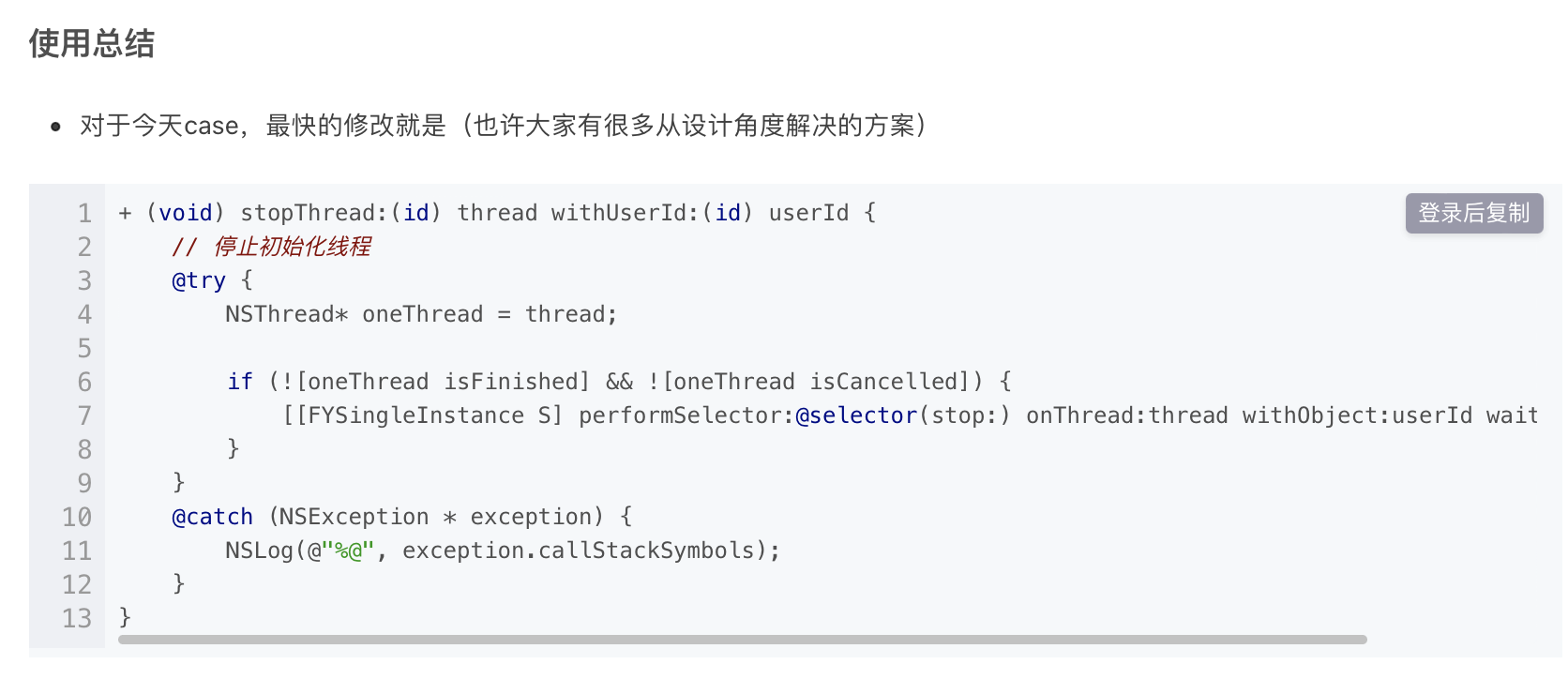
performSelector:onThread:withObject: waitUntilDone: 为什么会产生内存泄漏 ?
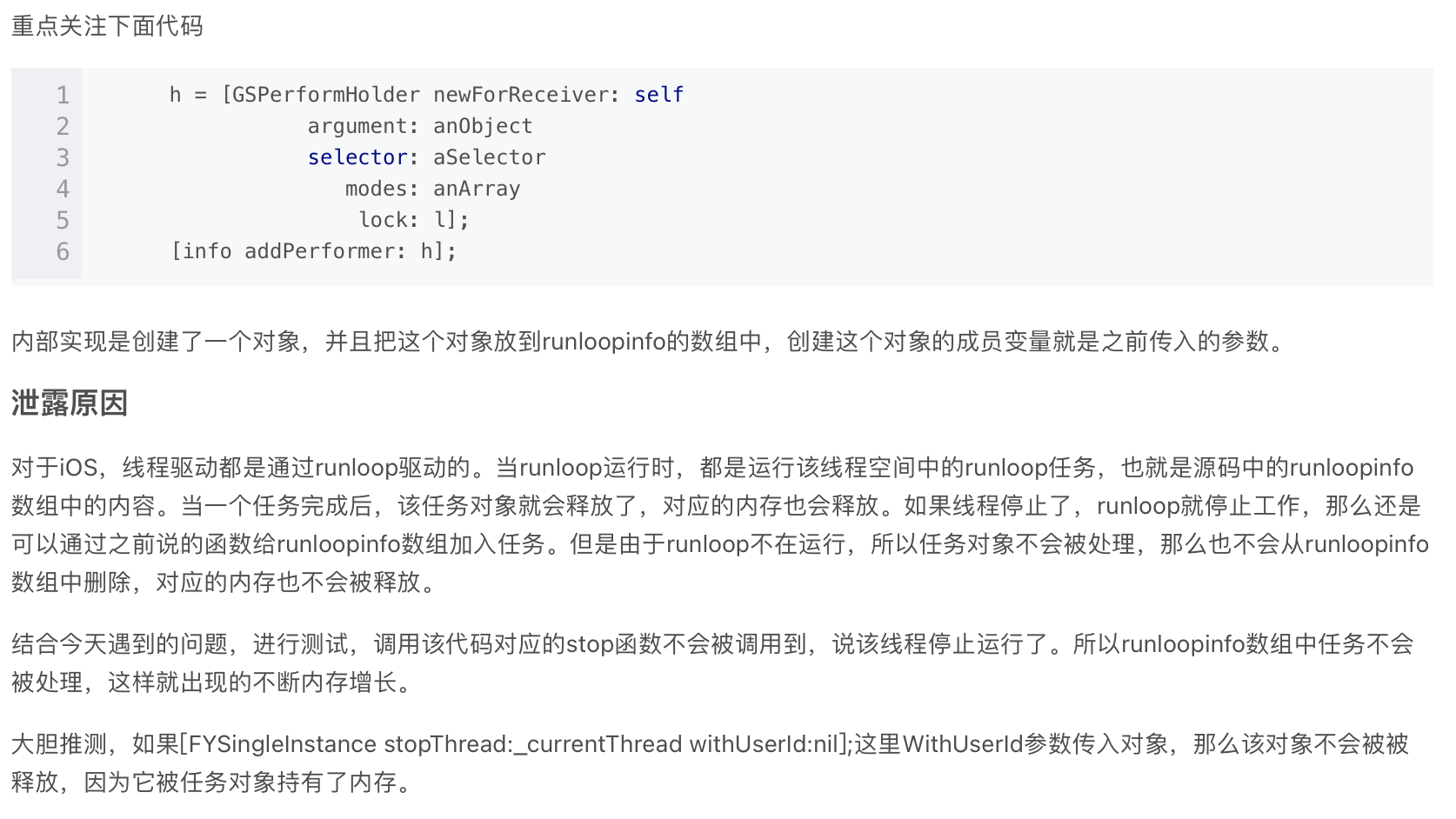
其根本原因是: 不应该在线程已经释放且runloop停止工作时在添加任务到runloopinfo数组中,所以解决办法就是添加前先判断线程是否可用、是否被取消了,可以正常使用再执行performSelector:onThread: