Utility - AlsoGhostglowDev/Ghost-s-Utilities GitHub Wiki
The general purpose utility class. Serves as a utility for the game and other miscellaneous purposes.
local util = require 'ghostutil.util'doTweenNumber(tag: string, a: number, b: number, ?duration: number, ?options: TweenOptions): voidCreates a number tween starting from a to b with the given duration and options.
Parameters:
-
tag: The tween's tag. -
a: The value the tween should start from. -
b: The value the tween will end at. -
duration(optional): Determines how long the tween will take, defaults to1. -
options(optional): The tween's options; Refer toTweenOptions.
Information: Calls onNumberTween (Refer to Callbacks) every number update. Use this to actually get the currently tweened value.
View Example
local veryCoolNumber = 14

-- increasing your number variable with a number tween.
util.doTweenNumber('coolTween', 14, 32, 3, {
    ease = 'expoOut'
})

-- actually settings the variable's value to the tweened value every time it updates.
function onNumberTween(tag, num)
    if tag == 'coolTween' then
        veryCoolNumber = num
    end
end
─────────────────────────
doTweenScale(tag: string, var: string, values: table<number>, ?duration: number, ?ease: string): voidTweens an object's scale to the given values.
Parameters:
-
tag: The tween's tag. -
var: The scalable object to tween. -
values: A table of two numbers corresponding to one respective axis.[1]forscale.xand[2]forscale.y -
duration(optional): Determines how long the tween will take, defaults to1. -
ease(optional): Determines the ease used on the tween. Refer toFlxEase. Defaults to'linear'.
Information: Calls onTweenCompleted on completion.
View Example
-- tweens dad's scale to double their size.
util.doTweenScale('coolScale', 'dad', {2, 2}, 1, 'expoInOut')
─────────────────────────
doTweenPosition(tag: string, var: string, values: table<number>, ?duration: number, ?ease: string): voidTweens an object's position to the given values.
Parameters:
-
tag: The tween's tag. -
var: The object to tween. -
values: A table of two numbers corresponding to one respective axis.[1]for x and[2]for y -
duration(optional): Determines how long the tween will take, defaults to1. -
ease(optional): Determines the ease used on the tween. Refer toFlxEase. Defaults to'linear'.
Information: Calls onTweenCompleted on completion.
View Example
-- tweens boyfriend's position to (X: 200, Y: 300)
util.doTweenPosition('coolPosition', 'boyfriend', {200, 300}, 1, 'expoInOut')
─────────────────────────
pauseTween(tag: string): voidPauses an active tween.
Parameters:
-
tag: The tween's tag.
─────────────────────────
resumeTween(tag: string): voidResumes a paused tween.
Parameters:
-
tag: The tween's tag.
─────────────────────────
toboolean(value: dynamic): booleanConverts any type of value into a boolean.
(Aliases: toBoolean, toBool)
Parameters:
-
value: The value to convert.
Returns: The converted boolean.
If the string
valueis '1' or 'true', thentrueis returned.
Else,falseis returned.
─────────────────────────
isOfType(value: dynamic, type: string): booleanChecks if the given value matches the given type.
(Shortcut to helper.isOfType)
Parameters:
-
value: The value to check. -
type: The matching type to check.
(can be nil, string, number, boolean, function, userdata, thread or table)
Returns: If the value matches the given type.
─────────────────────────
isnan(value: dynamic): booleanChecks if the given value is NaN (not a number).
(Aliases: isNaN)
Parameters:
-
value: The value to check.
Returns: If value is NaN.
─────────────────────────
isnil(value: dynamic): booleanChecks if the given value is nil.
(Aliases: isNil, isnull, isNull)
Parameters:
-
value: The value to check.
Returns: If value is nil.
─────────────────────────
isbool(value: dynamic): booleanChecks if the given value is a boolean.
(Aliases: isBool)
Parameters:
-
value: The value to check.
Returns: If value is a boolean.
─────────────────────────
isstring(value: dynamic): booleanChecks if the given value is a string.
(Aliases: isString)
Parameters:
-
value: The value to check.
Returns: If value is a string.
─────────────────────────
istable(value: dynamic): booleanChecks if the given value is a table.
(Aliases: isTable)
Parameters:
-
value: The value to check.
Returns: If value is a table.
─────────────────────────
switch(case: dynamic, cases: dictionary<any, void->dynamic>): dynamicSimple switch cases in Lua. Runs the function mapped to the key "default" if no other cases match.
Parameters:
-
case: The current case. -
cases: Dictionary of cases mapped to a function to execute corresponding to the given case.
Returns: The returned value from the executed function if there's any.
View Example
function onStepHit()
    -- prints "woah." at step 128.
    -- prints "that's sick!" at step 256.
    -- prints "pluh.." at every other step.
    util.switch(curStep, {
        [128] = function()
            debugPrint('woah.')
        end,
        [256] = function()
            debugPrint('that\'s sick!')
        end
        default = function()
            debugPrint('pluh..')
        end
    })
end

-- this would return '🦐'
util.switch('shrimp', {
    ['fish'] = function()
        return '🐟'
    end,
    ['shrimp'] = function()
        return '🦐'
    end
})
─────────────────────────
makeGradient(tag: string, width: number, height: number, colors: table<number|string>, ?chunkSize: number, ?rotation: number, ?interpolate: boolean): voidGenerates a solid gradient square as graphic for a sprite.
Parameters:
-
tag: The object to apply the gradient. -
width: The width of the gradient graphic. -
height: The height of the gradient graphic. -
colors: A table of hexadecimal numbers, needs atleast 2 elements. -
chunkSize(optional): The chunk size of the gradient. Increase the value if you're looking for an old-school look. Defaults to1. -
rotation(optional): The gradient's angle rotation in degrees, defaults to90. -
interpolate(optional): Uses RGB interpolation instead of linear RGB iftrueDefaults totrue.
View Example
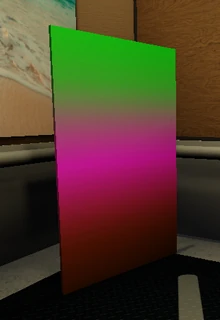
-- making the unpleasant gradient..
makeLuaSprite('gradient', nil, 100, 200)
util.makeGradient('gradient', 200, 400, {
    0x22D71D, 0x7A9374,
    0xFD2EF6, 0xC24462,
    0x9B5300
})
addLuaSprite('gradient')
─────────────────────────
applyTextMarkup(tag: string, ?text: string, markerPair: dictionary<string, number|string>): voidApplies formats to text between marker characters.
(Note: This will clear all text formats and return to the default format)
Parameters:
-
tag: The text object's tag. -
text(optional): The formatted text to apply. -
markerPair: Dictionary of different colors mapped to the corresponding marker character.
View Example
-- the making of a markup'd text.
makeLuaText('coolText', '', 0, 100, 100)
util.applyTextMarkup('coolText', 'i am %red% or am i perhaps may be &gray&..', {
    ['%'] = 0xFF0000,
    ['&'] = 0x808080
})
setTextSize('coolText', 24)
addLuaText('coolText')
─────────────────────────
getHealthColor(character: string): numberFetches the health color of the specified character.
Parameters:
-
character: The character to fetch the health color from.
(can be 'dad', 'bf' or 'gf')
Returns: The health color in hexadecimal (number).
─────────────────────────
getFps(): numberFetches the current framerate.
Returns: The frames per second.
─────────────────────────
getMemory(): numberFetches the garbage collector's memory in bytes.
Returns: The GC memory usage.
─────────────────────────
centerOrigin(object: string): voidCenters the origin of the specified object.
Parameters:
-
object: The object's tag.
─────────────────────────
setPosition(object: string, x: number, y: number): voidSets the position of the specified object.
Parameters:
-
object: The object's tag. -
x: The position on the x axis. -
y: The position on the y axis.
View Example
-- sets gf's position to (X: 800, Y: 900)
util.setPosition('gf', 800, 900)
─────────────────────────
getPosition(object: string): PointFetches the position of the specified object.
Parameters:
-
object: The object's tag.
Returns: The object's position in Point.
View Example
-- assuming boyfriend's position is (X: 100, Y: 200)
-- this will return 100.
util.getPosition('boyfriend').x
─────────────────────────
setOrigin(object: string, x: number, y: number): voidSets the origin of the specified object.
Parameters:
-
object: The object's tag. -
x: The origin on the x axis. -
y: The origin on the y axis.
─────────────────────────
getOrigin(object: string): PointFetches the origin of the specified object.
Parameters:
-
object: The object's tag.
Returns: The object's origin in Point.
─────────────────────────
setVelocity(object: string, x: number, y: number): voidSets the velocity of the specified object.
Parameters:
-
object: The object's tag. -
x: The velocity on the x axis. -
y: The velocity on the y axis.
─────────────────────────
getVelocity(object: string): PointFetches the velocity of the specified object.
Parameters:
-
object: The object's tag.
Returns: The object's velocity in Point.
─────────────────────────
parseJSON(content: string): dictionary<string, dynamic>Parses a JSON's content to a Lua dictionary.
(uses dkjson.lua by David Kolf)
Parameters:
-
content: The JSON's content.
Returns: The corresponding dictionary to the JSON's data.
View Example
-- usually done with Psych's getTextFromFile or file.read to parse file JSON instead.
local rawJSON = parseJSON(getTextFromFile('characters/bf.json'))
-- prints: 350
debugPrint(rawJSON.position.y)

-- you can also put in the JSON content manually:
-- returns "GhostUtil"
parseJSON('{ "using": "GhostUtil" }').using
─────────────────────────
stringifyJSON(data: dictionary<string, dynamic>, ?useIndent: boolean): stringEncodes the given JSON data from dictionary back to a JSON string.
(uses dkjson.lua by David Kolf)
Parameters:
-
data: Dictionary containing a JSON data. -
useIndent(optional): Enables indentation iftrue.
Returns: The encoded JSON string.
View Example
util.stringifyJSON({
    usingCodename = false,
    usingPsych = true,
    usingGhostUtil = true
}, true)

--[[
    this would (supposedly) return:
    {
        "usingCodename": false,
        "usingPsych": true,
        "usingGhostUtil": true
    }
]]
GhostUtil 3.0.0 • Docs 3.0.0, Revision 1
a Lua Library made by GhostglowDev; for Psych Engine
© 2025 GhostglowDev — Ghost's Utilities
Licensed under the MIT License.