Add and remove sculpture - AlbertProfe/sculptures GitHub Wiki
setPerson({
  ...person,
  lastName: e.target.value
});
The useState hook stores an object (person) representing the state.
The spread operator (...person) creates a shallow copy of the current person object and places its properties in a new object.
The next line, lastName: e.target.value, overwrites just the lastName property in that new object with the latest form input value.
This new object is then passed to setPerson, so React’s state is updated with a fresh object reference, ensuring React properly detects changes and triggers a re-render.
Immutability: This approach avoids modifying the original object in state, preserving past state values and preventing bugs that come from direct mutations, which React cannot track efficiently.
If we did:
person.lastName = e.target.value;
setPerson(person);
React might not re-render as expected, since the object reference hasn’t changed. Immutability ensures state updates are traceable and reliable, which is critical for React's rendering engine.
It overwrites just the lastName property in that new object with the latest form input value.
The mechanism behind the line
lastName: e.target.valuein the context of
setPerson({
  ...person,
  lastName: e.target.value
});
is due to how JavaScript object literals handle property assignment and overwriting.
- Spread Operator Creates a Shallow Copy:
- The
...personsyntax extracts all enumerable own properties from the existingpersonobject and copies them into a new object. - This means the new object initially has all the same properties and values as
person. - A shallow copy creates a new object copying only the first-level properties:
- Nested objects inside still reference the original data, not duplicated.
- Property Overwriting in Object Literals:
- In JavaScript, when defining an object literal, if the same property key appears multiple times, the last occurrence takes precedence and overwrites any previous ones.
- In this case, the property
lastNameappears inside the spread (...person) and again explicitly aslastName: e.target.value.
- Resulting Object:
- The newly created object will contain all properties from
person. - Then, the
lastNameproperty is set to the value ofe.target.value, overwriting the original value from the spread. - This effectively creates a new object with just the
lastNameproperty changed.
- Why Order Matters:
- Placing spread first and the property last ensures the property overwrites the copied value.
- Reversing the order would cause the overwrite to be discarded because the later spread would overwrite your changes.
This pattern immutably updates an object by cloning it and replacing just the desired property (
lastName) with a new value in one concise expression. It leverages JavaScript's behavior where later properties in object literals overwrite earlier ones.
setArtists([
  ...artists,
  { id: nextId++, name: name }
]);
It works as follows:
-
artistsis an array stored in React state usinguseState. - The spread operator (
...artists) creates a shallow copy of the existing array. - A new object representing an artist
{ id: nextId++, name: name }is appended to this copied array. -
setArtiststhen replaces the old state with this new array. - This pattern avoids mutating the original array directly, preserving React's state immutability principle.
- By creating a new array with the added item, React detects the state change and triggers the component to re-render with the updated list.
This is the standard immutable approach to adding an item to an array state in React.
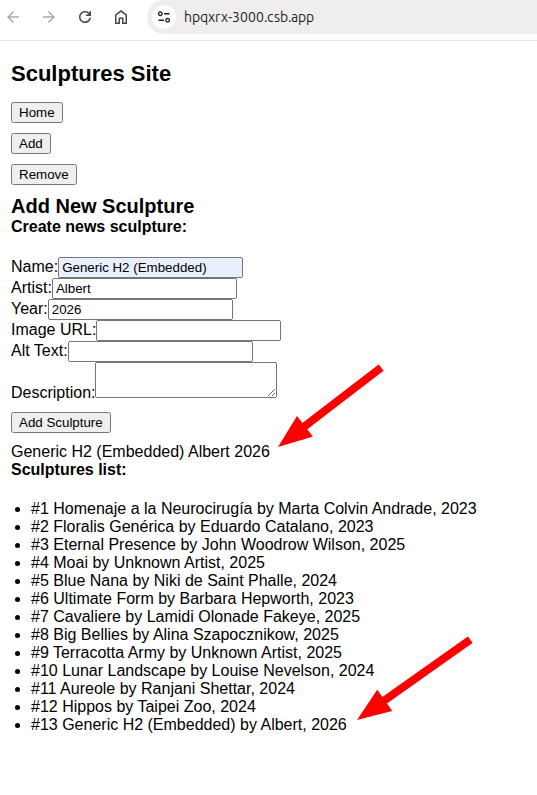
The SculpturesAdd component manages a form for adding new sculptures to a list rendered on the page.
It uses React's
useStatehook twice—once to track the current sculpture being entered (sculpturestate) and once to maintain the full list ofsculptures(sculptures state) initialized from an importedsculptureListarray.
| Aspect | Description |
|---|---|
| State Variables |
sculpture: stores form input as an object; sculptures: array with all sculptures |
| Controlled Inputs | Each input’s value bound to sculpture state; updates made via handleChange function |
| State Update |
handleChange uses spread operator to immutably update one property without changing others |
| Form Submission |
handleSubmit prevents default, adds new sculpture to sculptures array immutably, triggers re-render |
| UI Feedback | Displays live current form input values above list |
| List Rendering | Maps sculptures array to <li> elements showing index, name, and artist |
| React Principles | Demonstrates controlled components, immutable updates, list rendering, and separation of concerns |
import { useState } from "react";
import { sculptureList } from "./data.js";

export default function SculpturesAdd() {
  const [sculpture, setSculpture] = useState({
    name: "",
    artist: "",
    year: "",
    url: "",
    alt: "",
    description: "",
  });
  const [sculptures, setSculptures] = useState(sculptureList);

  function handleChange(e) {
    setSculpture({
      ...sculpture,
      [e.target.name]: e.target.value,
    });
  }

  function handleSubmit(e) {
    e.preventDefault();
    // Here we would normally handle adding the sculpture
    console.log("New Sculpture:", sculpture);
    setSculptures([...sculptures, sculpture]);
  }

  return (
    <>
      <h2>Add New Sculpture</h2>
      <h4>Create news sculpture:</h4>
      <form onSubmit={handleSubmit}>
        <label>
          Name:
          <input
            name="name"
            value={sculpture.name}
            onChange={handleChange}
            required
          />
        </label>{" "}
        <br />
        <label>
          Artist:
          <input
            name="artist"
            value={sculpture.artist}
            onChange={handleChange}
            required
          />
        </label>{" "}
        <br />
        <label>
          Year:
          <input
            name="year"
            type="number"
            value={sculpture.year}
            onChange={handleChange}
          />
        </label>{" "}
        <br />
        <label>
          Image URL:
          <input name="url" value={sculpture.url} onChange={handleChange} />
        </label>{" "}
        <br />
        <label>
          Alt Text:
          <input name="alt" value={sculpture.alt} onChange={handleChange} />
        </label>{" "}
        <br />
        <label>
          Description:
          <textarea
            name="description"
            value={sculpture.description}
            onChange={handleChange}
          />
        </label>{" "}
        <br />
        <button type="submit">Add Sculpture</button>
      </form>
      {sculpture.name} {sculpture.artist} {sculpture.year} {sculpture.url}{" "}
      {sculpture.alt} {sculpture.description}
      <h4>Sculptures list:</h4>
      <ul>
        {sculptures.map((scul, index) => (
          <li key={index}>
            {"#"}
            {index + 1} {scul.name} by {scul.artist}, {scul.year}{" "}
          </li>
        ))}
      </ul>
    </>
  );
}
The
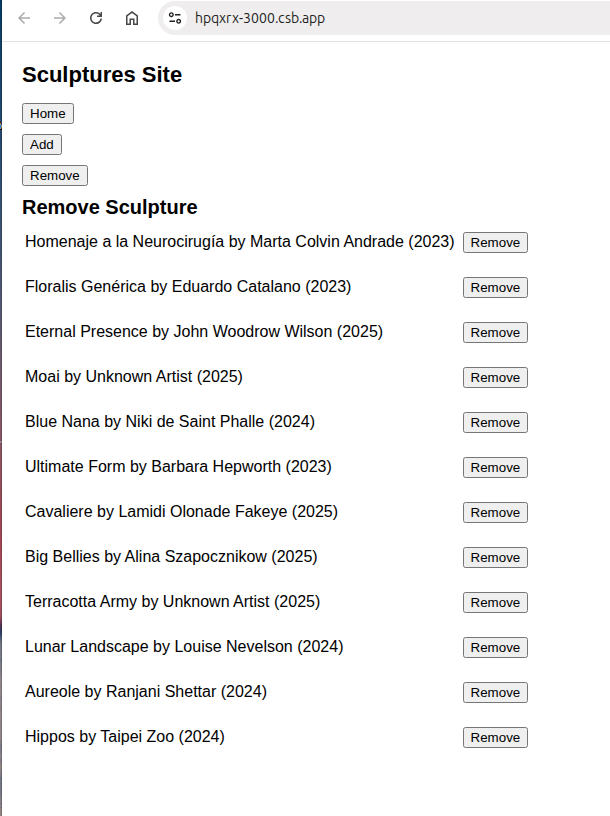
SculpturesRemovecomponent allows users to dynamically remove sculptures from a list. It stores the sculptures in local state and renders them in a table format, each with a “Remove” button.
Clicking this button filters out the corresponding entry immutably, triggering a re-render to update the UI. This demonstrates React’s state management, array filtering techniques, and dynamic rendering with tables.
| Aspect | Description |
|---|---|
| State Management | Uses useState to hold the sculptures list, initialized with sculptureList. |
| Remove Function |
handleRemove filters the sculptures array, excluding the one with the matching index. |
| Key Prop | Uses index as key inside map; important for list rendering and removal accuracy. |
| UI Structure | Renders sculptures in a <table> with rows containing name, artist, year, and a “Remove” button. |
| React Concepts | Shows immutable state updates, array filtering, controlled re-rendering after state changes. |
| Practical Usage | Offers a straightforward UI for dynamically managing lists with React state and event handling. |
import { useState } from "react";
import { sculptureList } from "./data.js";

export default function SculpturesRemove() {
  const [sculptures, setSculptures] = useState(sculptureList);

  function handleRemove(idToRemove) {
    setSculptures(sculptures.filter((scul, index) => index !== idToRemove));
  }

  return (
    <>
      <h2>Remove Sculpture</h2>
      <table>
        {sculptures.map((scul, index) => (
          <tr>
            <td key={index}>
              {scul.name} by {scul.artist} ({scul.year}){" "}
            </td>
            <td></td>
            <td>
              <button onClick={() => handleRemove(index)}>Remove</button>
            </td>
          </tr>
        ))}
      </table>
    </>
  );
}