Animations - AdamCvijanovic/Herding-Ghosts-Unity GitHub Wiki
Aseprite Steps
How to Animate
First off here's a tutorial on how animating works in Aseprite https://youtu.be/B0enS9BJne4
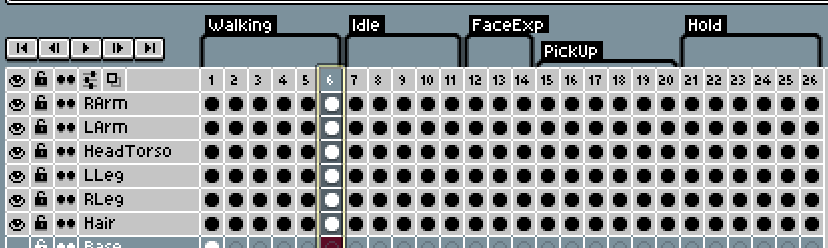
Separate moving parts on your animation into different Layers, as you can see in the image where I have the body parts separated. You can also select and add tags to your keyframes to separate them as in the below image. Please keep it organised and readable so the person putting the animation together in Unity can understand it. For reference: Character Walk is 6 frames. It doesn't need to be detailed.
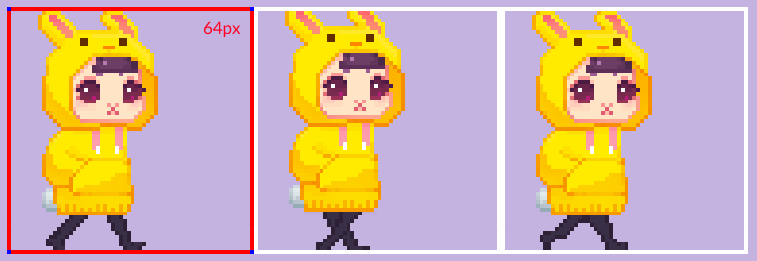
Export Export as a horizontal strip.
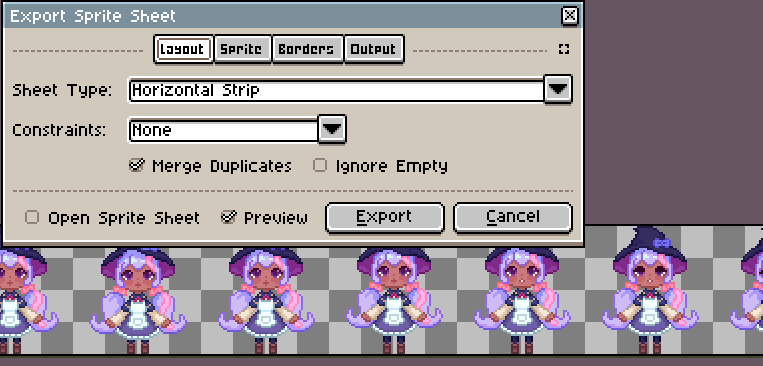
Sprite sheet
Set canvas to the resolution of the sprite (32x or 64x). Times it by how many frames there are in the animation. 3 frame walk example:
Unity Setup
In Unity on the sprite sheet asset:
- Select "Multiple" sprites and slice them by the resolution of the sprite (64/32/24)
- The rest have the same settings as in the Style Guide
- Open "Animation" and "Animator" windows
- Make a new animation file, title it something specific ie Player Walk Left/right/up/down, Ghost Customer Idle, etc. and place in it's own folder
- Click on the sprite sheet asset to open and view sliced frames
- Place frames along timeline and space them so it looks good
Animations Required
Player
- Walk
- Idle
- Concentrating
- Victory pose
- Failed recipe
Ghost Cat
- Kneading dough
- Idle
Ghost Dog
- Walk
Customer
- Walk/floating
Food cooking
- Cauldron stir/bubbles
- Oven on/off
- Sparkle on finished food
Crops
- Sprouts
- Almost
- Fully Grown
Objects