Mail system - AAU-Dat/P3-Code-Bookingsystem GitHub Wiki
There are different ways of making an automated mailing system.
SQL Server - Database mail
Database Mail is an enterprise solution for sending e-mail messages from the SQL Server Database Engine or Azure SQL Managed Instance. Using Database Mail, your database applications can send e-mail messages to users. The messages can contain query results, and can also include files from any resource on your network.
Database Mail is designed for reliability, scalability, security, and supportability.
The SQL server mailing system uses four primary components
- Configuration and security components
- Messaging components
- Database Mail executable
- Logging and auditing components
Database Mail has two configuration objects: The database configuration objects provide a way for you to configure the settings that Database mail should use when sending an email from your database application or SQL Server Agent.
- Database Mail acounts
- Database Mail profiles
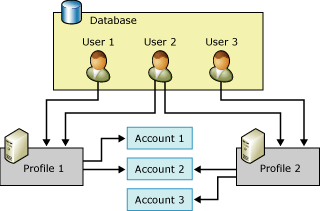
Further information can be found here
SMTP (Unsure if this is available for NET 5.0 or just obsolete)
Simple Mail Transfer Protocol is allegedly the most common communication standard used in email transmission, because it is quick and easy.
This is a library/namespace System.Net.Mail, specifically made for ASP.NET to automate communication.
It uses the SmtpClicent class as an application to mail using the SMTP. MailMessage is the mail class that is used to construct a mail, it includes the following properties Attachment, Bcc, CC, BodyEncodining, HeadersEncoding, Body, Priority, To, ReplyToList, From and Subject
Further information can be found here and here
SendGrid - Email API
Disclaimers
If you have a lacking understanding of STMP after reading the previous section and provided sources, then please read this
First of all, it must be stated that this is freely available with some non essential missing features.1
All requests must be made over HTTPS. The API does not support HTTP.
Prerequisites
Before you can start using the API, you need to do the following:
Building a API call
The API must have the following components:
- A host
- An Authorization header
- A request
API Keys
SendGrid’s Web API v3 supports the use of API Keys. API Keys allow you to use another method of authentication separate from your account username and password. API Keys add an additional layer of security for your account and can be assigned specific permissions to limit which areas of your account they may be used to access. API Keys can be generated in your account. To use keys, you must set a plain text header named “Authorization” with the contents of the header being “Bearer XXX” where XXX is your API Secret Key.
API Keys can be used to authenticate the use of SendGrid’s v3 Web API, or the Mail API endpoint. API Keys may be assigned certain permissions, or scopes, that limit which API endpoints they are able to access.
Your application, mail client, or website can all use API (Application Programming Interface) keys to authenticate access to SendGrid services. You can revoke an API key at any time without having to change your username and password, and an API key can be scoped to perform a limited number of actions.
There are 3 different types of API keys:
- Full Access: Allows the API key to access
GET,PATCH,PUT,DELETEandPOSTendpoints for all parts of your account, excluding billing and Email Address Validation. - Restricted Access: Customizes levels of access for all parts of your account, excluding billing and Email Address Validation.
- Billing Access: Allows the API key to access billing endpoints for the account.
Mail Send Endpoint
The Mail Send endpoint allows you to send email over SendGrid’s v3 Web API
In order to send a dynamic template, specify the template ID with the template_id parameter.
Further documentation can be found here and here
Conclusion
SQL server and SMTP require a server to setup, but that gives the advantage of full control, where as SendGrid has the opposite effect. The scalability of all of them are relative, but scale won't be relevant for this project.
When do we need to send mails?
Mails are required to be sent at different points in the systems execution. This also varies depending on how the system is implemented. For now assume there are no monetary transactions, then the mails need to be sent at these times
- When a reservation is made / requested => Borgerforeningen & maybe Guest
- When a reservation is accepted or declined => Guest
- When an upcoming reservation is close to starting
- When a reservation has ended (?)