#2 프로젝트 개발환경 구성 - 4sorflow/Opensource_training GitHub Wiki
Linux 환경
Tensorflow 설치
(출처 : https://www.tensorflow.org/install/install_sources)
- Bazel 설치(컴파일 환경) 설치

https://docs.bazel.build/versions/master/install-ubuntu.html#install-on-ubuntu
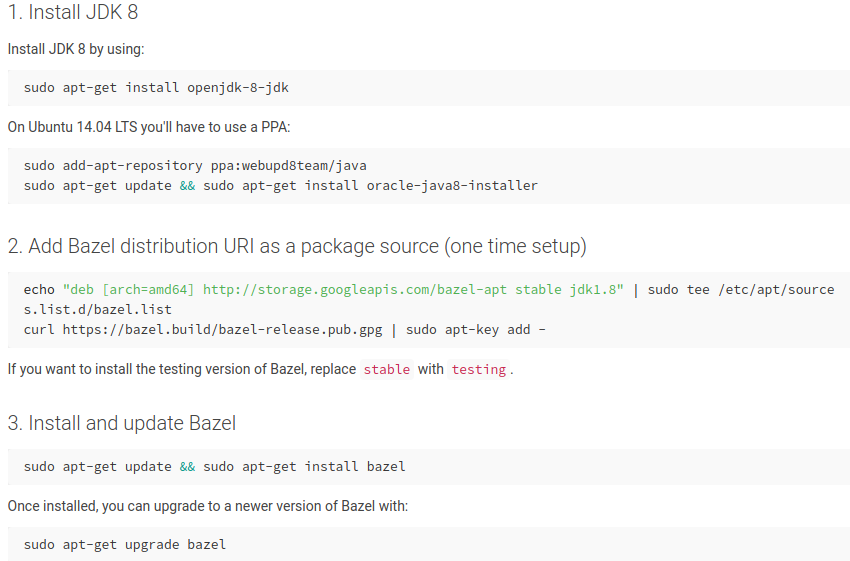
///( https://github.com/bazelbuild/bazel/releases 에서 설치할 수도 있다. )
- TensorFlow Python 의존성
python 2.7
$ sudo apt-get install python-numpy swig python-dev python-wheel
python 3.x
$ sudo apt-get install python3-numpy swig python3-dev python3-wheel
- GPU 사용시 추가적인 드라이버
"GPU를 쓰지않고 하는 방법을 하였으므로 생략, 첨부된 링크를 참조"
git에서 tensorflow clone, git 개발환경 구축
$ git clone https://github.com/tensorflow/tensorflow
$ git remote add upstream https://github.com/tensorflow/tensorflow
$ git remote add origin https://github.com/<<your repository>>/tensorflow
build 하는 방법
git에서 다운받은 tensorflow 폴더에서 ./configure 을 실행하여 build 설정을 한다.
$ cd tensorflow  # cd to the top-level directory created
$ ./configure
Please specify the location of python. [Default is /usr/bin/python]: /usr/bin/python2.7
Found possible Python library paths:
  /usr/local/lib/python2.7/dist-packages
  /usr/lib/python2.7/dist-packages
Please input the desired Python library path to use.  Default is [/usr/lib/python2.7/dist-packages]

Using python library path: /usr/local/lib/python2.7/dist-packages
Do you wish to build TensorFlow with MKL support? [y/N]
No MKL support will be enabled for TensorFlow
Please specify optimization flags to use during compilation when bazel option "--config=opt" is specified [Default is -march=native]:
Do you wish to use jemalloc as the malloc implementation? [Y/n]
jemalloc enabled
Do you wish to build TensorFlow with Google Cloud Platform support? [y/N]
No Google Cloud Platform support will be enabled for TensorFlow
Do you wish to build TensorFlow with Hadoop File System support? [y/N]
No Hadoop File System support will be enabled for TensorFlow
Do you wish to build TensorFlow with the XLA just-in-time compiler (experimental)? [y/N]
No XLA support will be enabled for TensorFlow
Do you wish to build TensorFlow with VERBS support? [y/N]
No VERBS support will be enabled for TensorFlow
Do you wish to build TensorFlow with OpenCL support? [y/N]
No OpenCL support will be enabled for TensorFlow
Do you wish to build TensorFlow with CUDA support? [y/N] Y
CUDA support will be enabled for TensorFlow
Do you want to use clang as CUDA compiler? [y/N]
nvcc will be used as CUDA compiler
Please specify the Cuda SDK version you want to use, e.g. 7.0. [Leave empty to default to CUDA 8.0]: 8.0
Please specify the location where CUDA 8.0 toolkit is installed. Refer to README.md for more details. [Default is /usr/local/cuda]:
Please specify which gcc should be used by nvcc as the host compiler. [Default is /usr/bin/gcc]:
Please specify the cuDNN version you want to use. [Leave empty to default to cuDNN 6.0]: 6
Please specify the location where cuDNN 6 library is installed. Refer to README.md for more details. [Default is /usr/local/cuda]:
Please specify a list of comma-separated Cuda compute capabilities you want to build with.
You can find the compute capability of your device at: https://developer.nvidia.com/cuda-gpus.
Please note that each additional compute capability significantly increases your build time and binary size.
[Default is: "3.5,5.2"]: 3.0
Do you wish to build TensorFlow with MPI support? [y/N]
MPI support will not be enabled for TensorFlow
Configuration finished
bazel을 이용하여 build한다.
//cpu버전
bazel build --config=opt //tensorflow/tools/pip_package:build_pip_package
(또는 bazel build -c opt //tensorflow/tools/pip_package:build_pip_package)

//gpu버전
bazel build --config=opt --config=cuda //tensorflow/tools/pip_package:build_pip_package
두 명령 중하나를 선택하여 실행하면 'bazel-'파일이 여러개 생성된다.

bazel-bin/tensorflow/tools/pip_package/build_pip_package /tmp/tensorflow_pkg
/tmp/tensorflow_pkg 파일에 .whl파일이 생성된다.
///////////////오류 주의///////////////
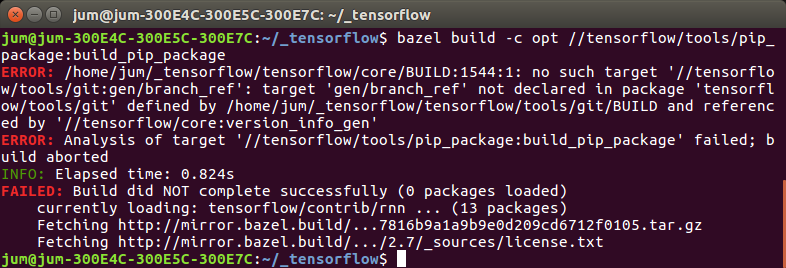
./configure을 설정하지 않고 실행하면 오류가 날 수 있다.
tensorflow가 저장된 경로에 한글이 있어도 오류가 날 수도 있으니 주의하자 만약 오류가 발생하였다면 git에서 tensorflow를 새로 받아본다.
/////////////////////////////////////
이후 tensorflow의 버전에 맞게 아래 명령어를 실행하면
sudo pip install /tmp/tensorflow_pkg/tensorflow-1.3.0-py2-none-any.whl
패킹이 완료된다.
개발 도구 설치
Jupyter 설치

tensorflow debuger (TDB) 설치
pip install tfdebugger
파이썬 쉘에서 다음을 쳐주면 Jupyter에서도 연동된다.
import notebook.nbextensions
import urllib
import zipfile
SOURCE_URL = 'https://github.com/ericjang/tdb/releases/download/tdb_ext_v0.1/tdb_ext.zip'
urllib.urlretrieve(SOURCE_URL, 'tdb_ext.zip')
with zipfile.ZipFile('tdb_ext.zip', "r") as z:
    z.extractall("")
notebook.nbextensions.install_nbextension('tdb_ext',user=True)